v01.2026.05.200
This page documents the official TASS Release Notes for software version v01.2026.05.200, including new features and corrections.
Use this page to review all features, enhancements, and fixes included in this release.

The Friendly Release allows ‘Friendly Schools’ to trial new features and provide feedback before the General Release. Occasionally, additional updates and fixes are included between these two release dates. A caret symbol (^) signifies features that are only available in the General Release version.
Major Items
Module | Details |
|---|---|
Display Other Leave Type Descriptions on Staff Calendar ^ | The Leave Type for Other Applications now displays in the Summary field of calendar events in Staff Kiosk Payroll/HR > My Payroll/HR > Staff Calendar. Schools can activate this feature by assigning the '----View Other Leave Type on Calendar' permission in TASS.web System Admin > Users > Portal Security Permissions for Staff Kiosk. When granted this permission, users will see the exact Leave Type Description in the Summary field rather than just 'Other'. ^ Refer to the 'My Payroll/HR' article on the TASS Knowledge Base for more information. An image of the new '----View Other Leave Type on Calendar' permission in the Portal Security Permissions program: 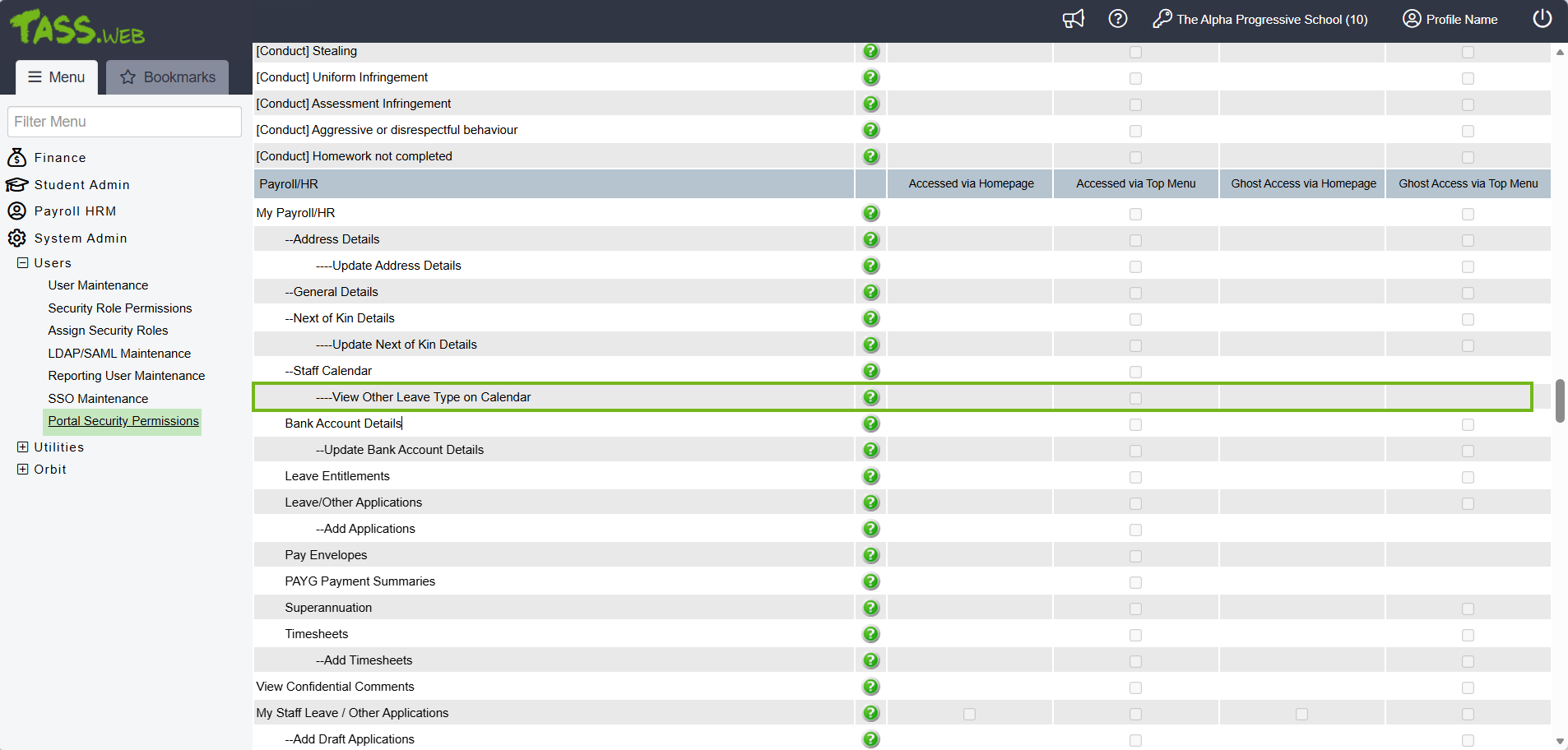 An image of the Other Leave Type in the Staff Calendar when the '----View Other Leave Type on Calendar' permission is enabled for the logged-in user: 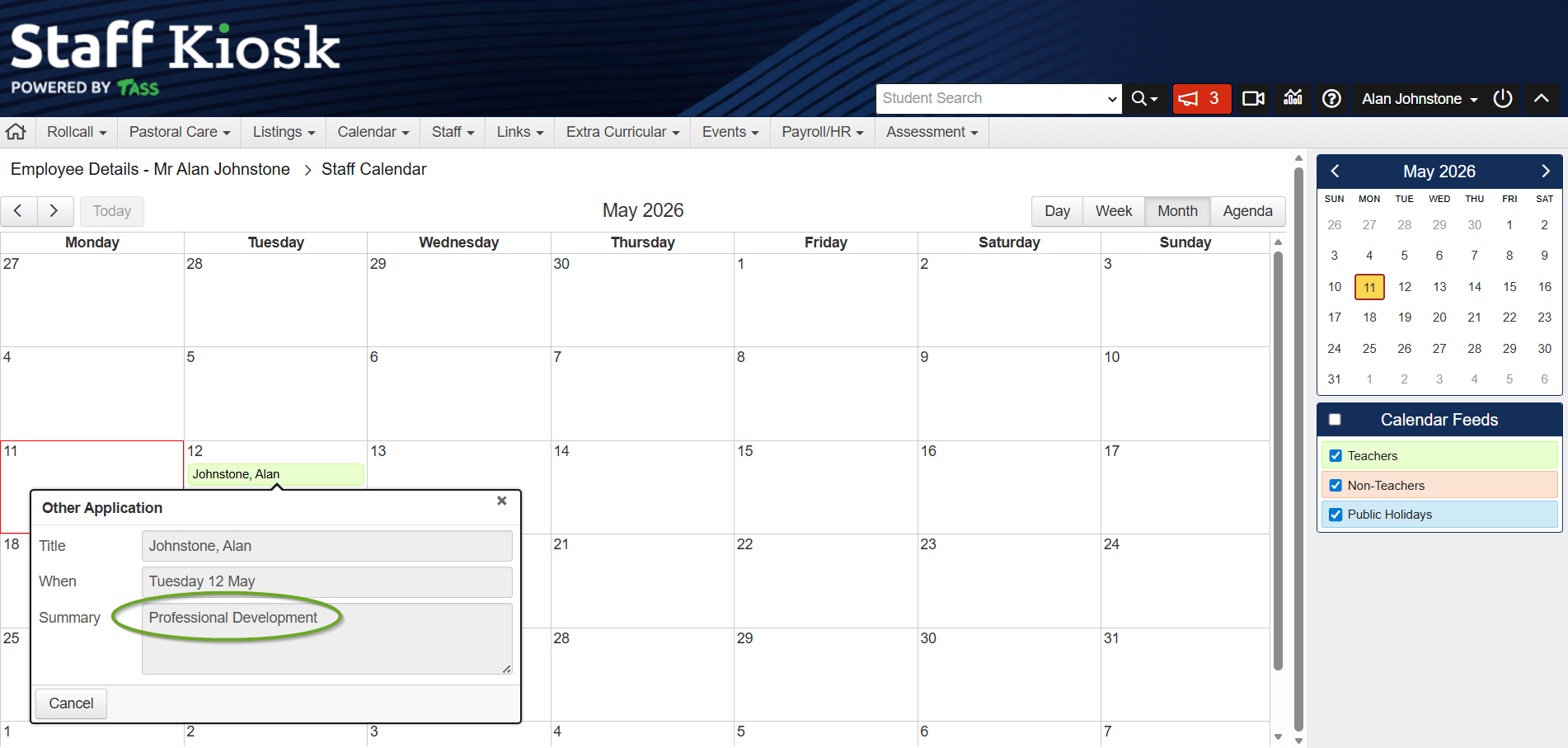 |
API Endpoint Maintenance - Logging and Analytics | The TASS.web API Endpoint Maintenance program now includes a comprehensive logging and analytics suite. School administrators can now access real-time API audit logs, user activity statistics, endpoint usage metrics, and error tracking directly from the User Interface. This enhancement helps schools proactively monitor API health, diagnose integration issues faster, and make data-driven decisions about API access and usage. Refer to the 'API Endpoint Maintenance' article on the TASS Knowledge Base for more information. An image of the new API logging and analytics suite on the ‘API Endpoint Maintenance’ program interface: 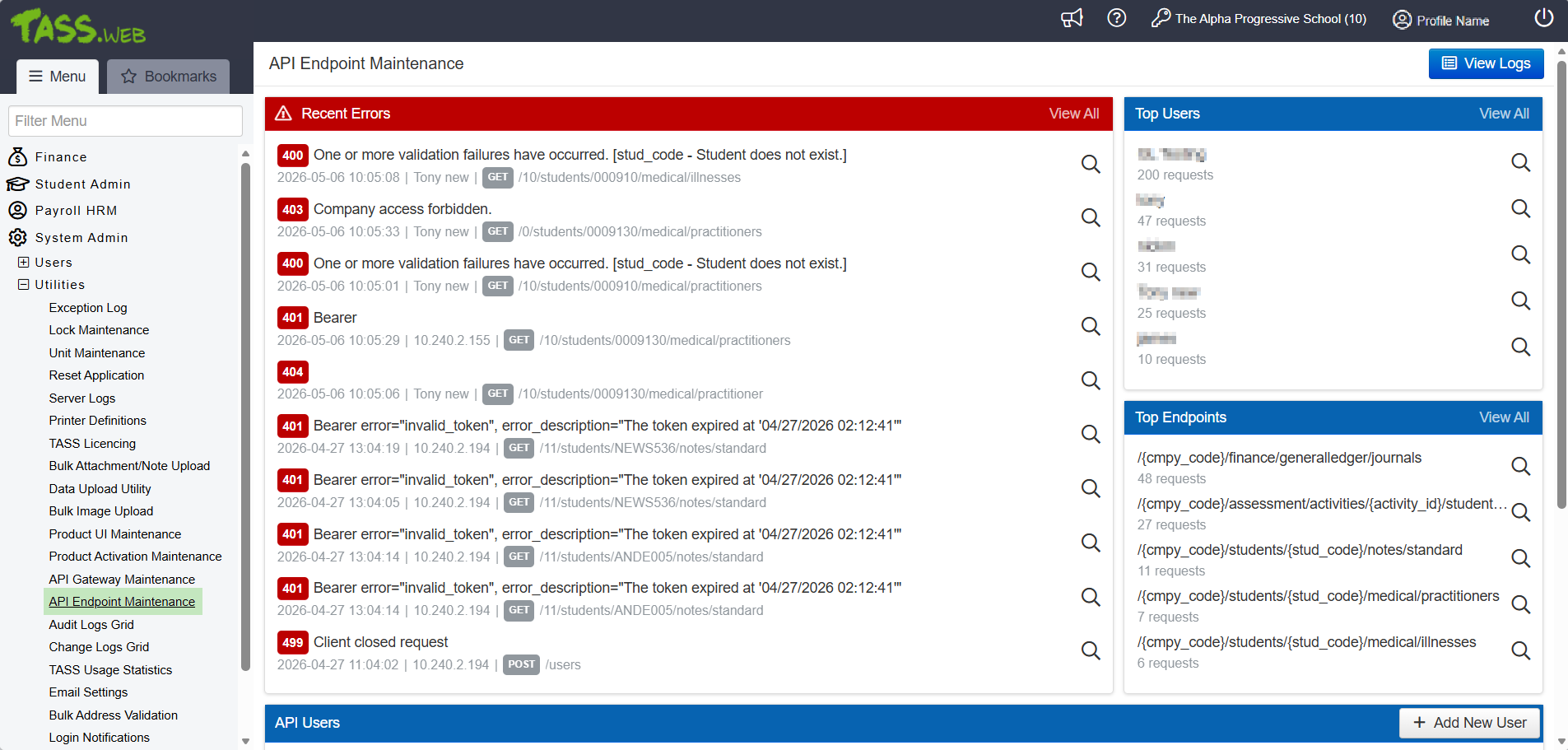 An image of the ‘API Audit Log’ screen accessed via the ‘View Logs’ button in the ‘API Endpoint Maintenance’ program: 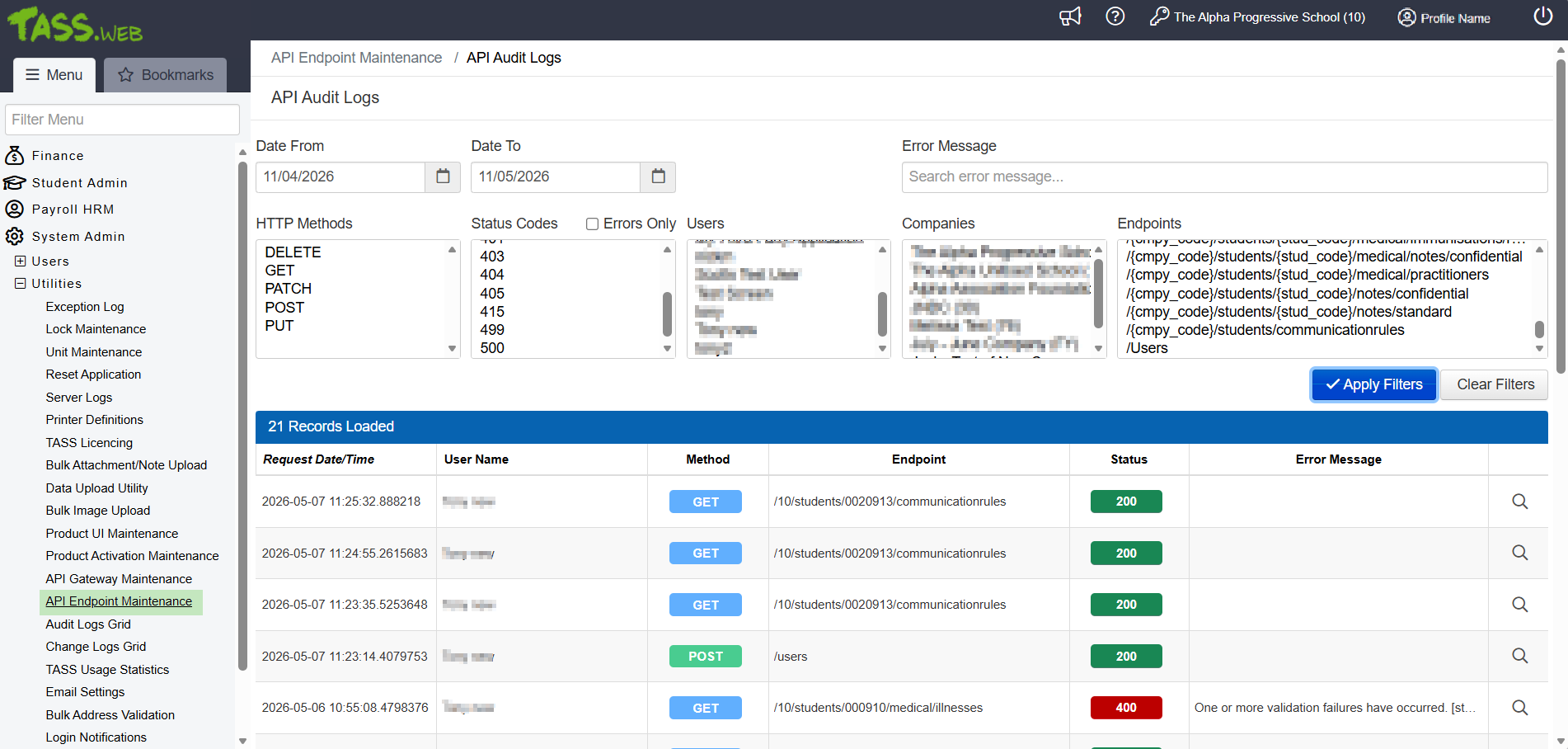 |
Invoice Approval Workflow ^ | A new Invoice Approval program is available in the Staff Kiosk > Staff menu, enabling staff to verify that goods and services have been received before approving invoices for payment in TASS.web. This enhancement improves financial control, reduces the risk of erroneous or fraudulent payments, and streamlines communication between Accounts Payable and staff. ^ Refer to the 'Running Hold Payments Processing in Staff Kiosk Invoice Approvals' article on the TASS Knowledge Base for more information. An image of the new ‘Staff Kiosk Pending Hold Type’ and ‘Staff Kiosk Rejected Hold Type’ fields in the TASS.web Accounts Payable Setup program: 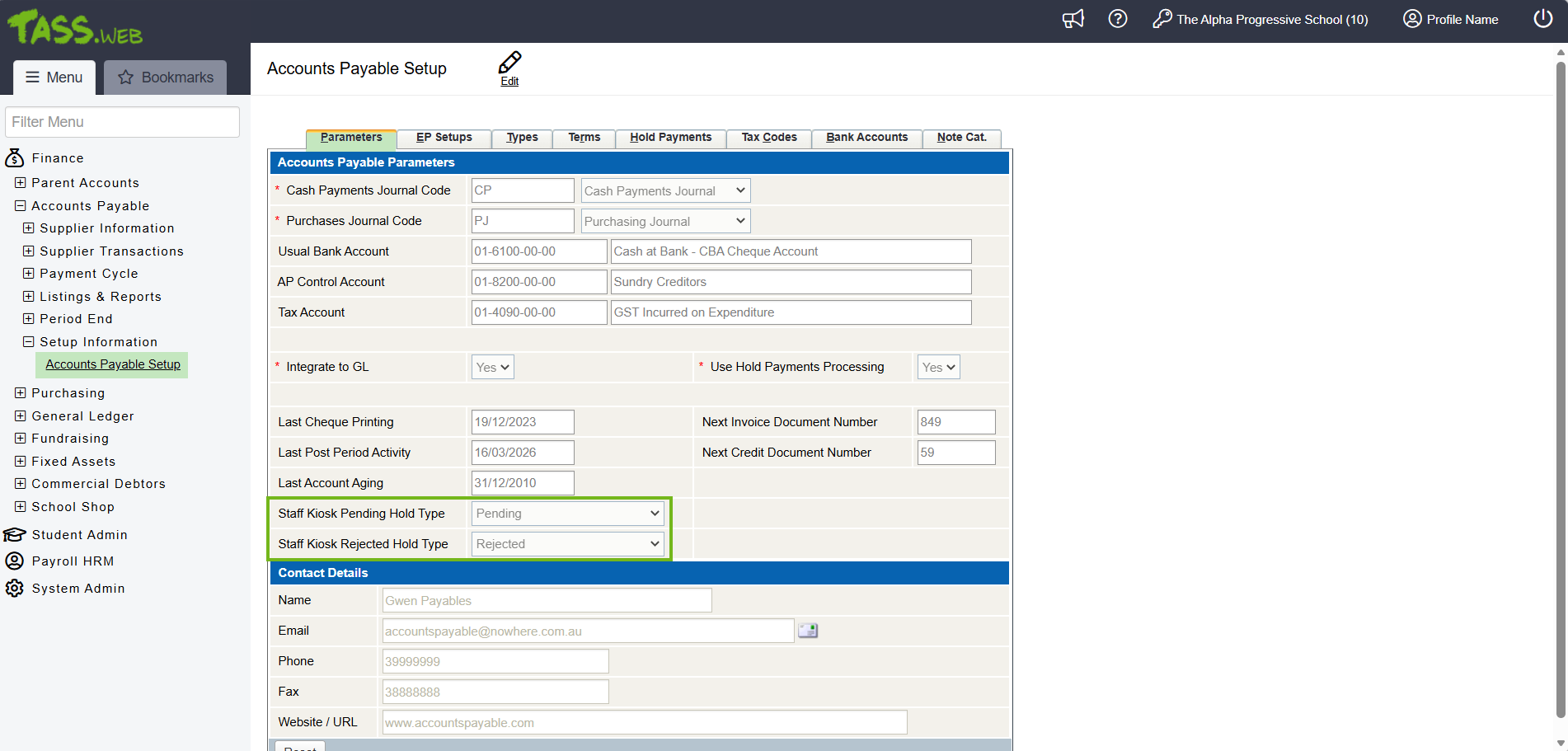 An image of the new ‘Invoice Approval has been assigned’ System Email Template in the Email Settings program: 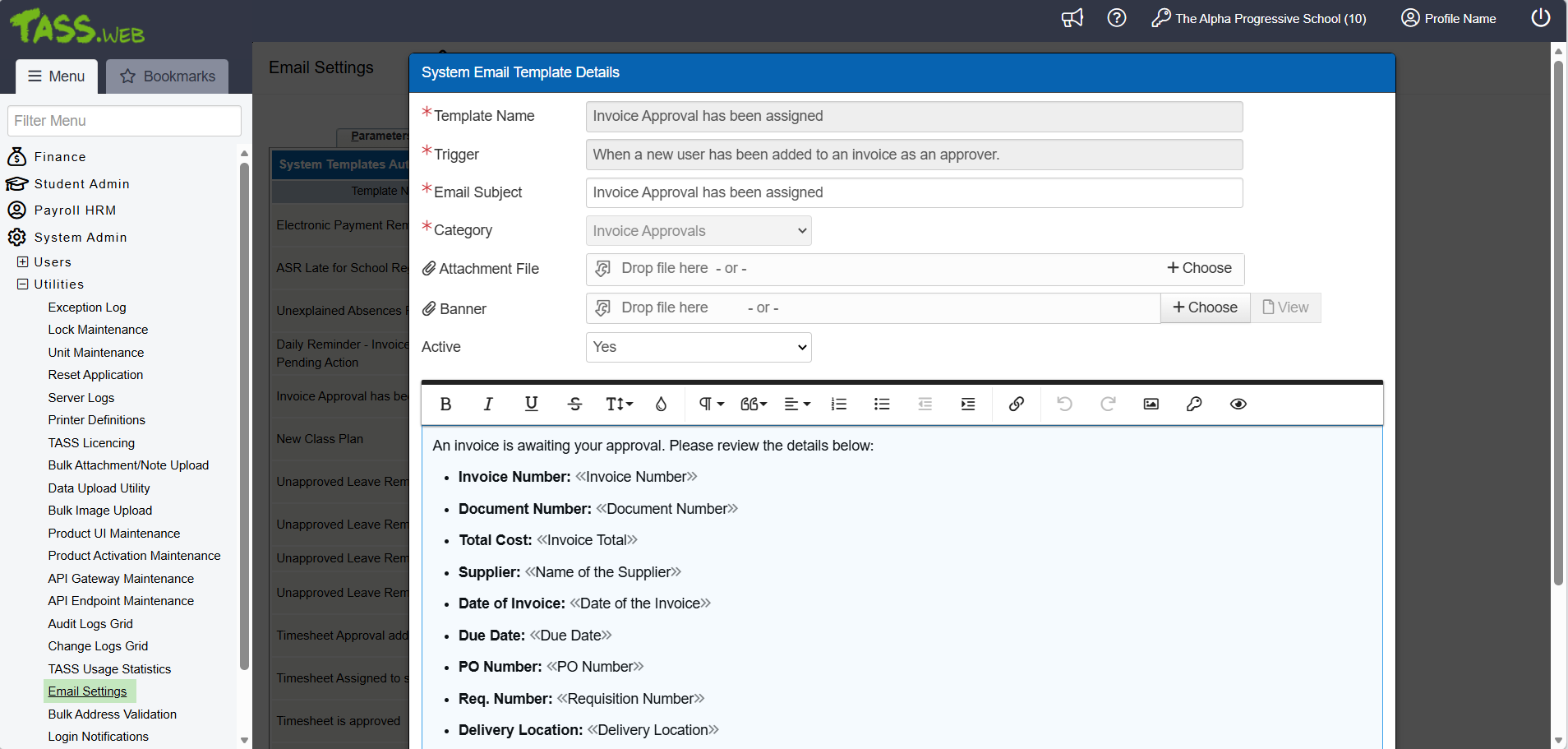 An image of the new ‘Daily Reminder - Invoice Approvals Pending Action’ System Email Template in the Email Settings program: 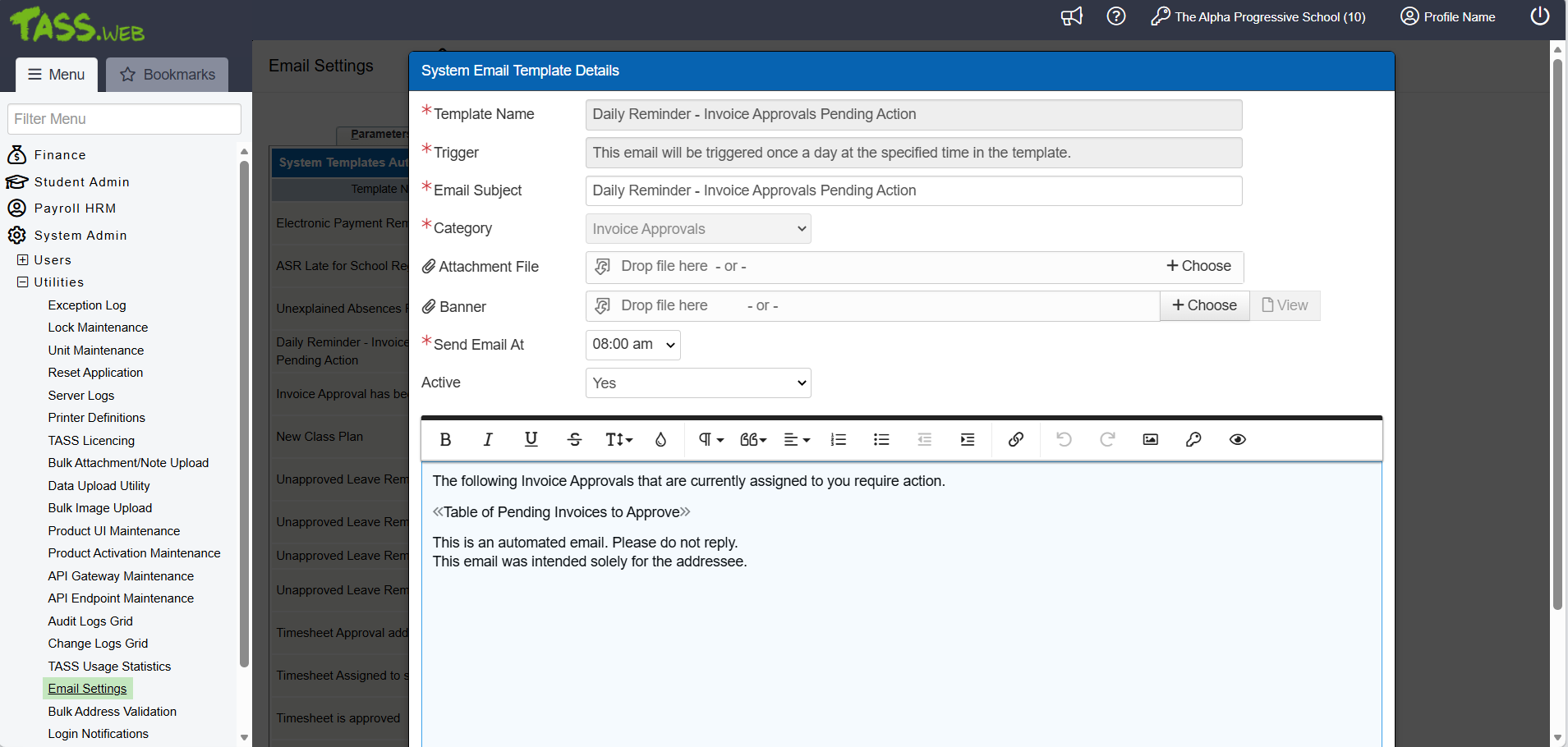 An image of the new Portal Security Permissions for the Staff Kiosk Invoice Approvals program: 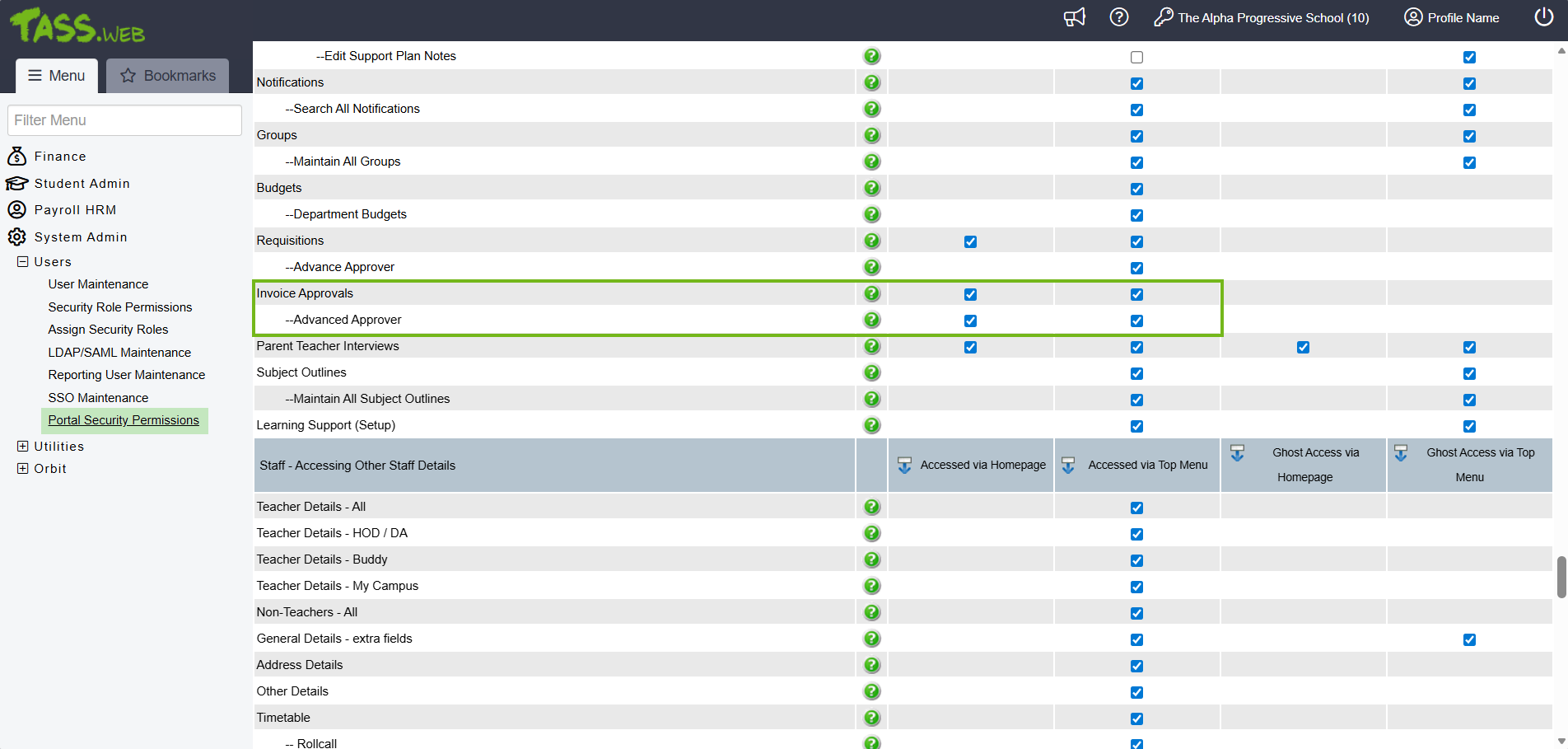 Images of the new Invoice Approvals program in Staff Kiosk: 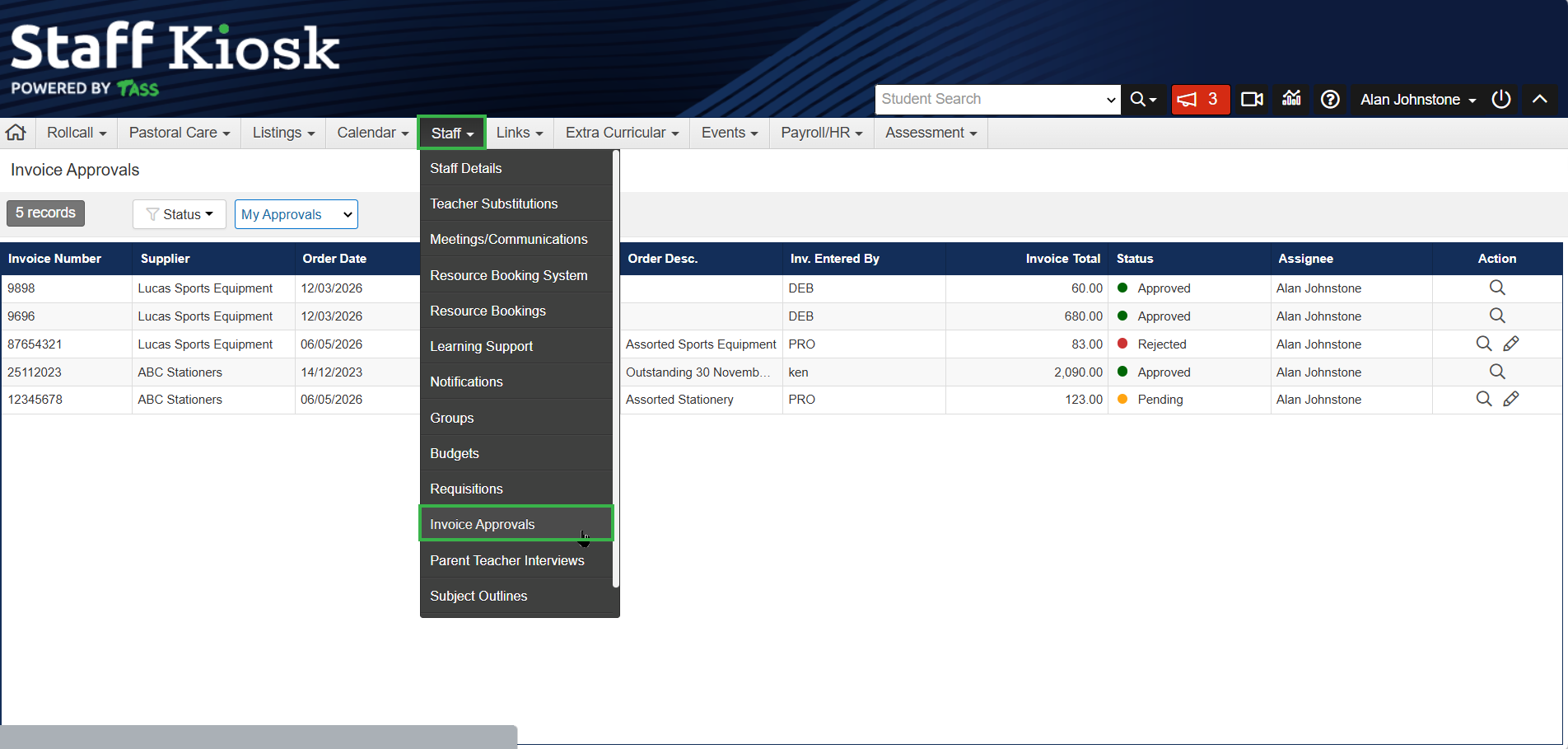 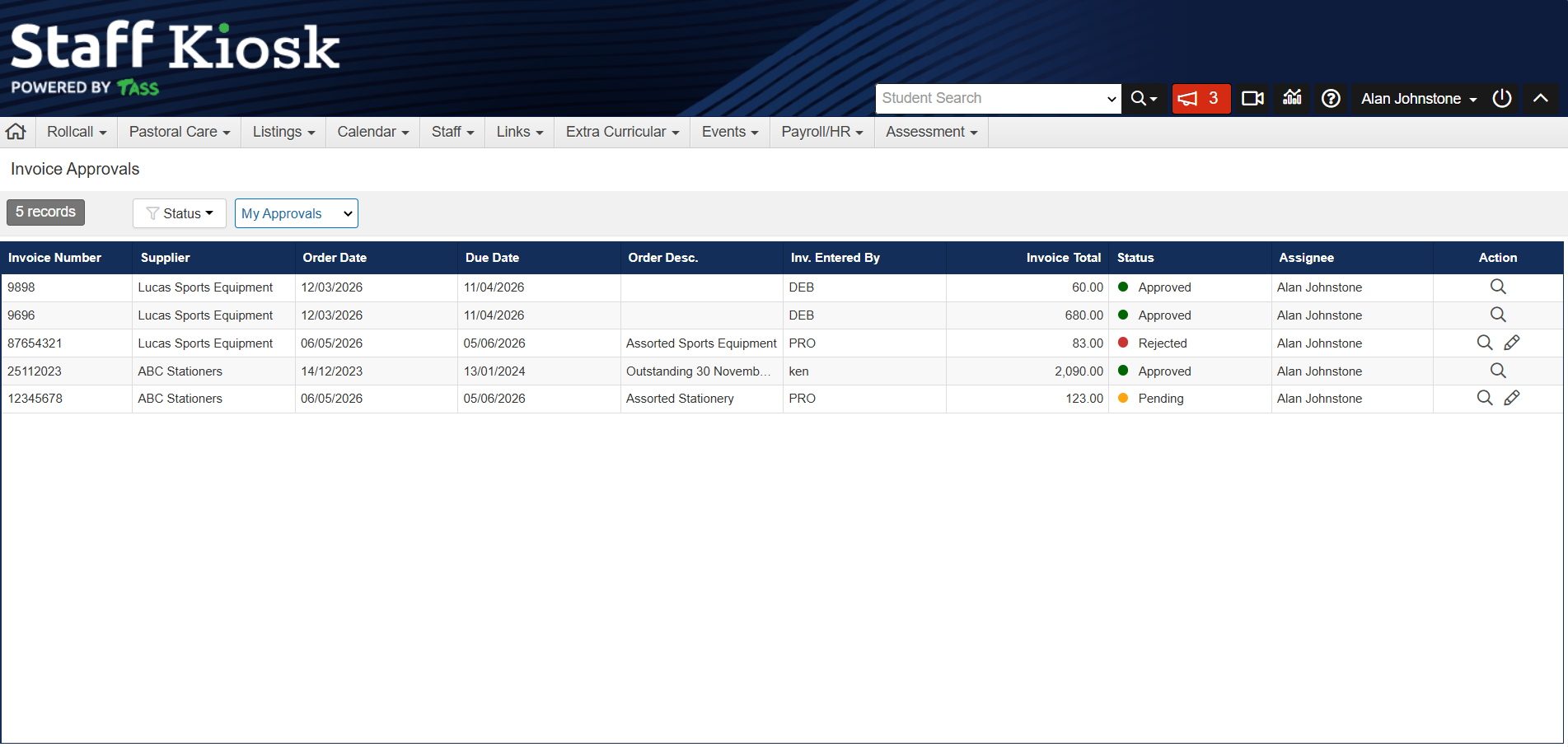 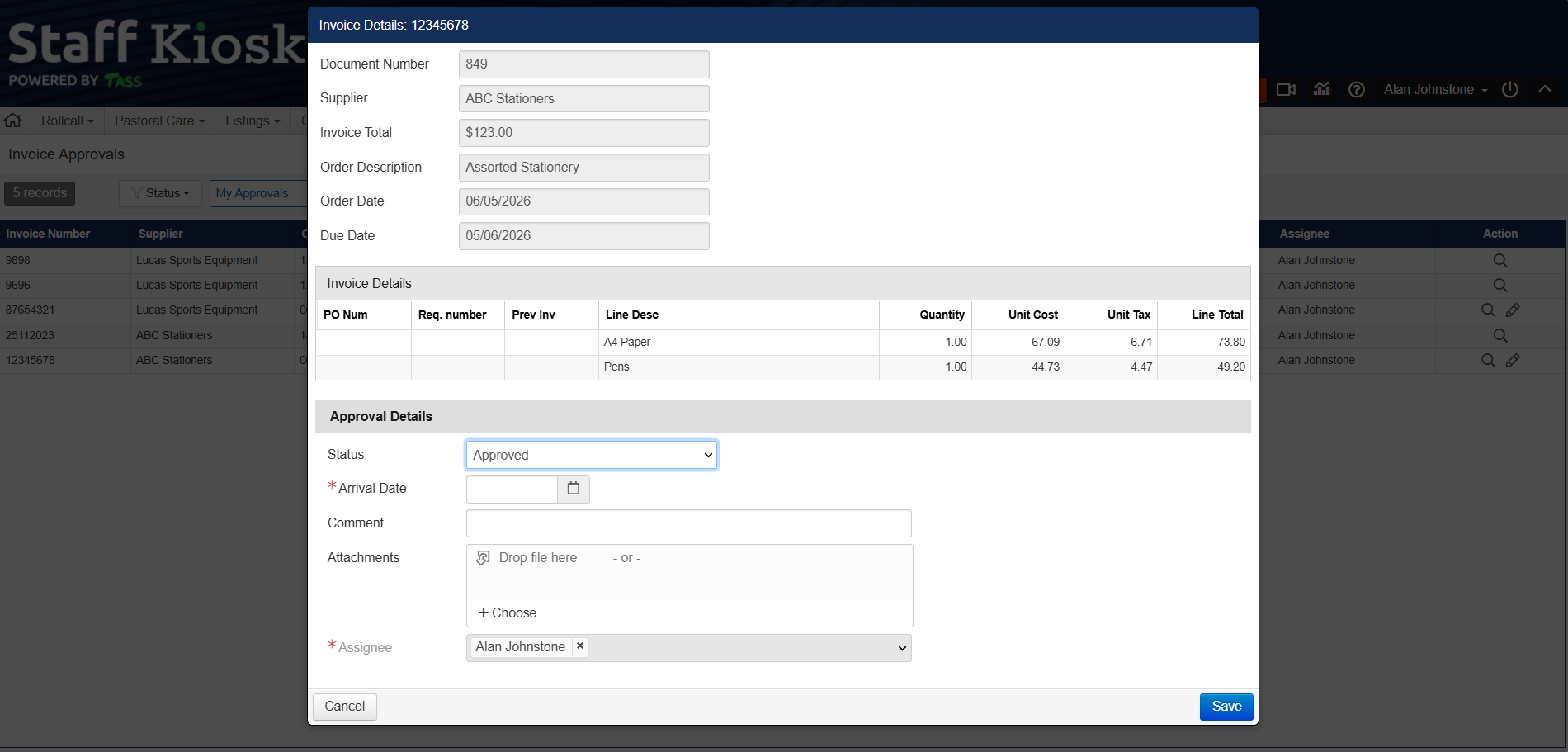 An image of the new ‘View Details’ button and ‘Invoice Approvals Change History' screen in the TASS.web Accounts Payable > Invoices program: 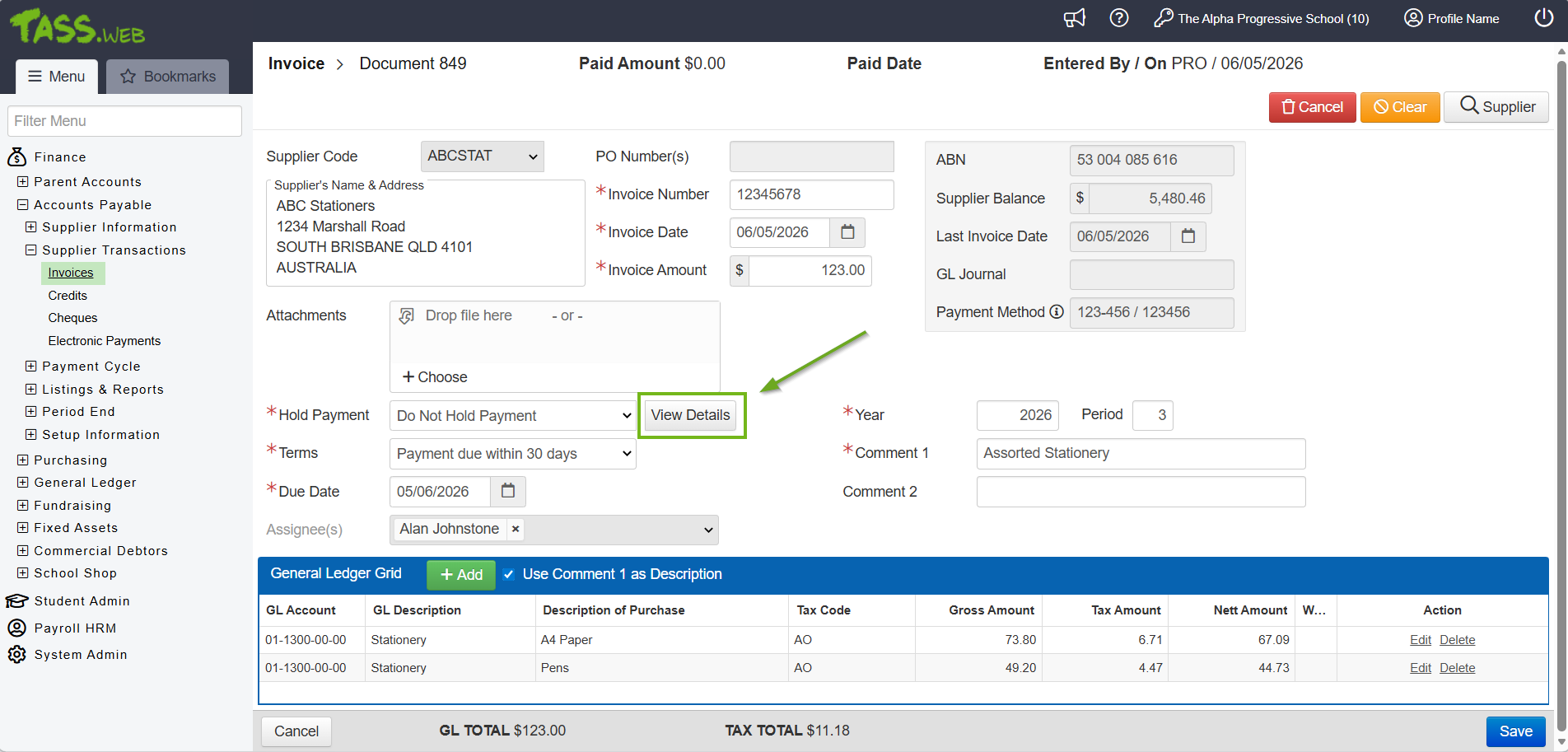 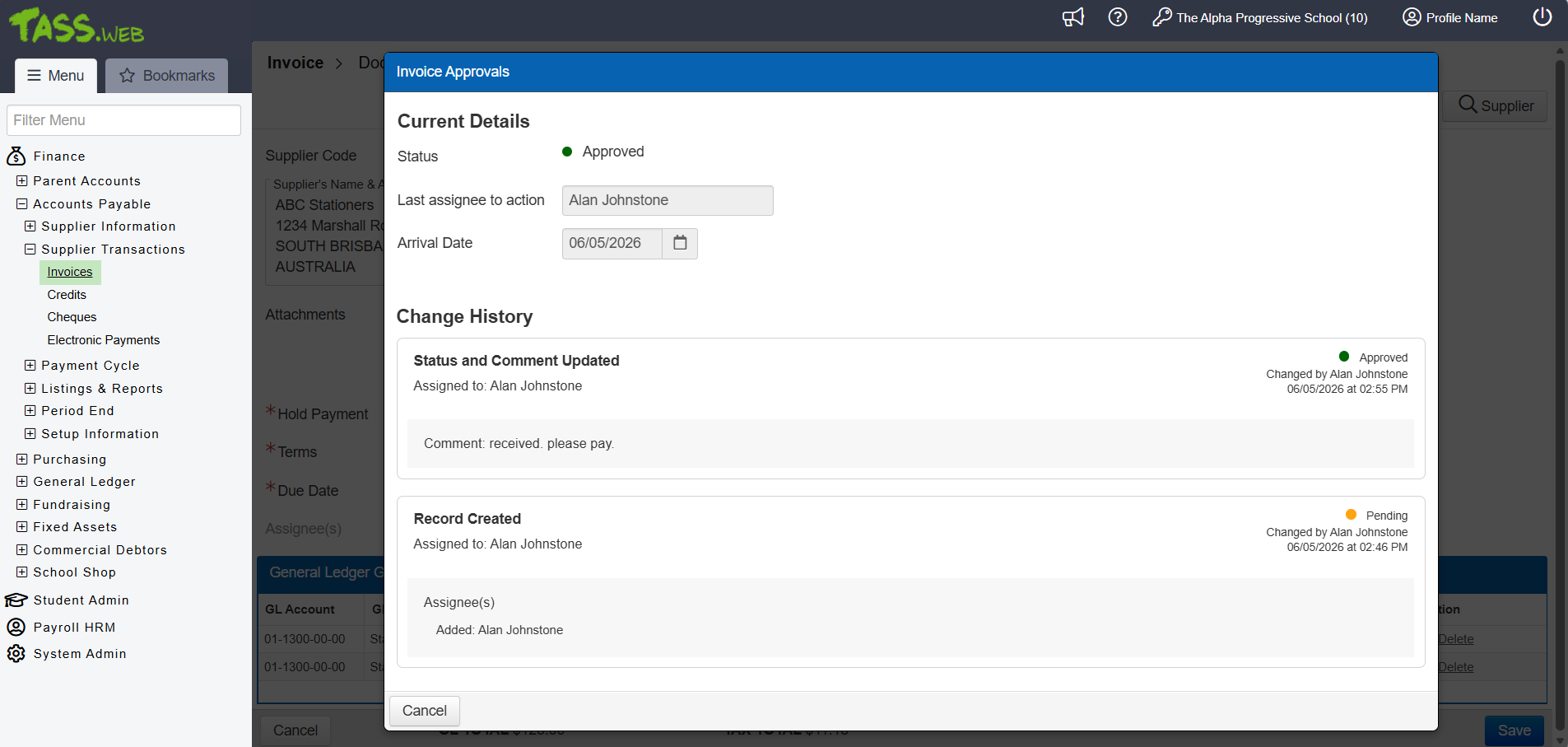 |
Orbit Extra Curricular Hub - Display Activities when not assigned ^ | A new 'Display When Not Assigned' checkbox is available for Extra Curricular Activities in TASS.web Student Admin > Extra Curricular > Setup Information > Extra Curricular Setup. When selected, this checkbox allows the selected Activity to appear in the Extra Curricular Hub in Student Orbit and Parent Orbit for all students, including those not assigned to it. ^ Refer to the 'Extra Curricular Setup' article on the TASS Knowledge Base for more information. An image of the new ‘Display When Not Assigned’ checkbox in the Extra Curricular Setup program. 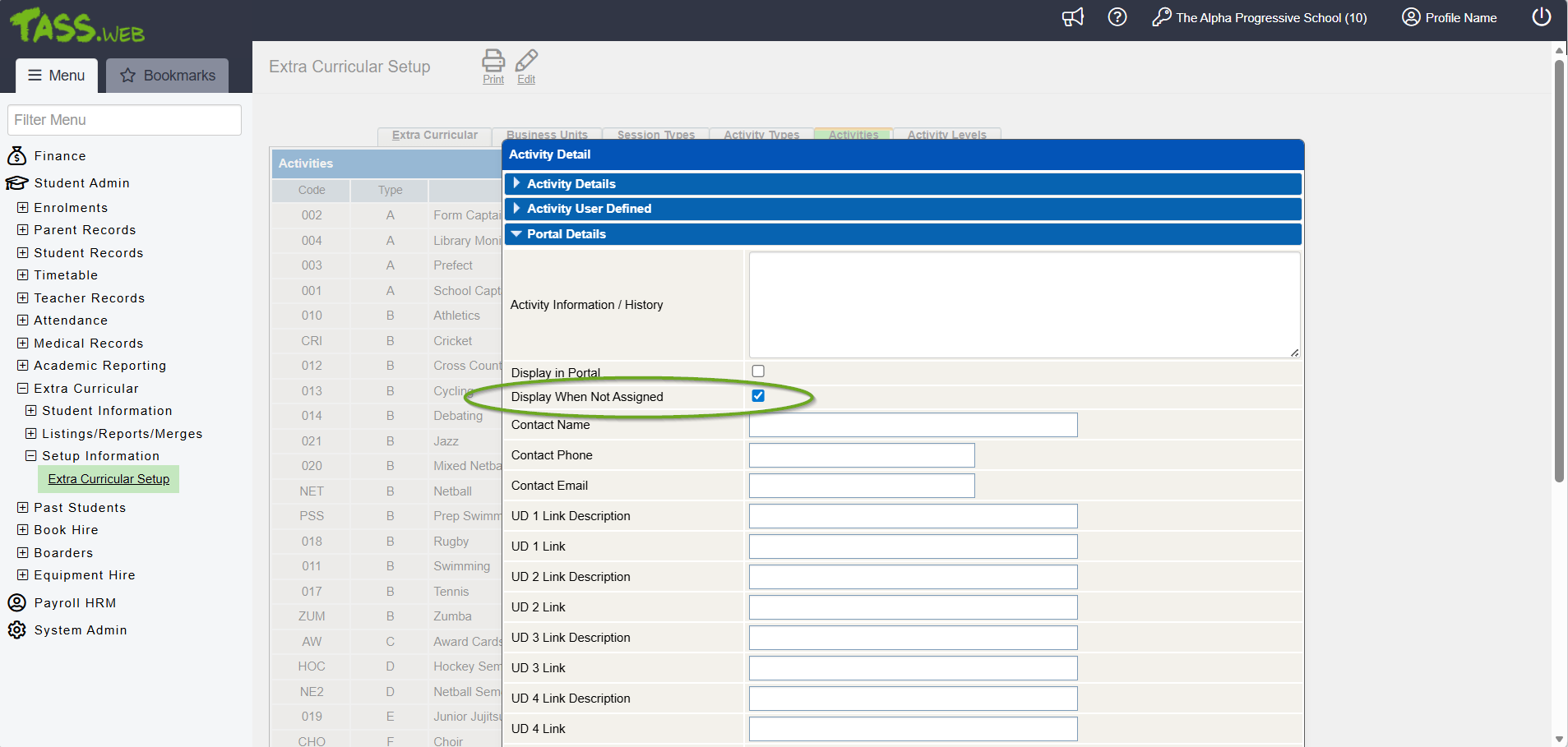 |
Absence Reason - View in Parent Lounge Flag ^ | A new 'View in Parent Lounge' setting for Absentee Reasons has been introduced in TASS.web Student Admin > Attendance > Setup Information > Attendance Setup. When it is set to 'Yes' and the Absentee Type 'View in Parent Lounge' flag is also set to 'Yes', student absence records will be visible in the Attendance History areas of Parent Lounge and Parent Orbit. ^ Refer to the 'Absentee Reasons Tab' article on the TASS Knowledge Base for more information. An image of the new ‘View in PL’ column on the Absentee Reasons tab: 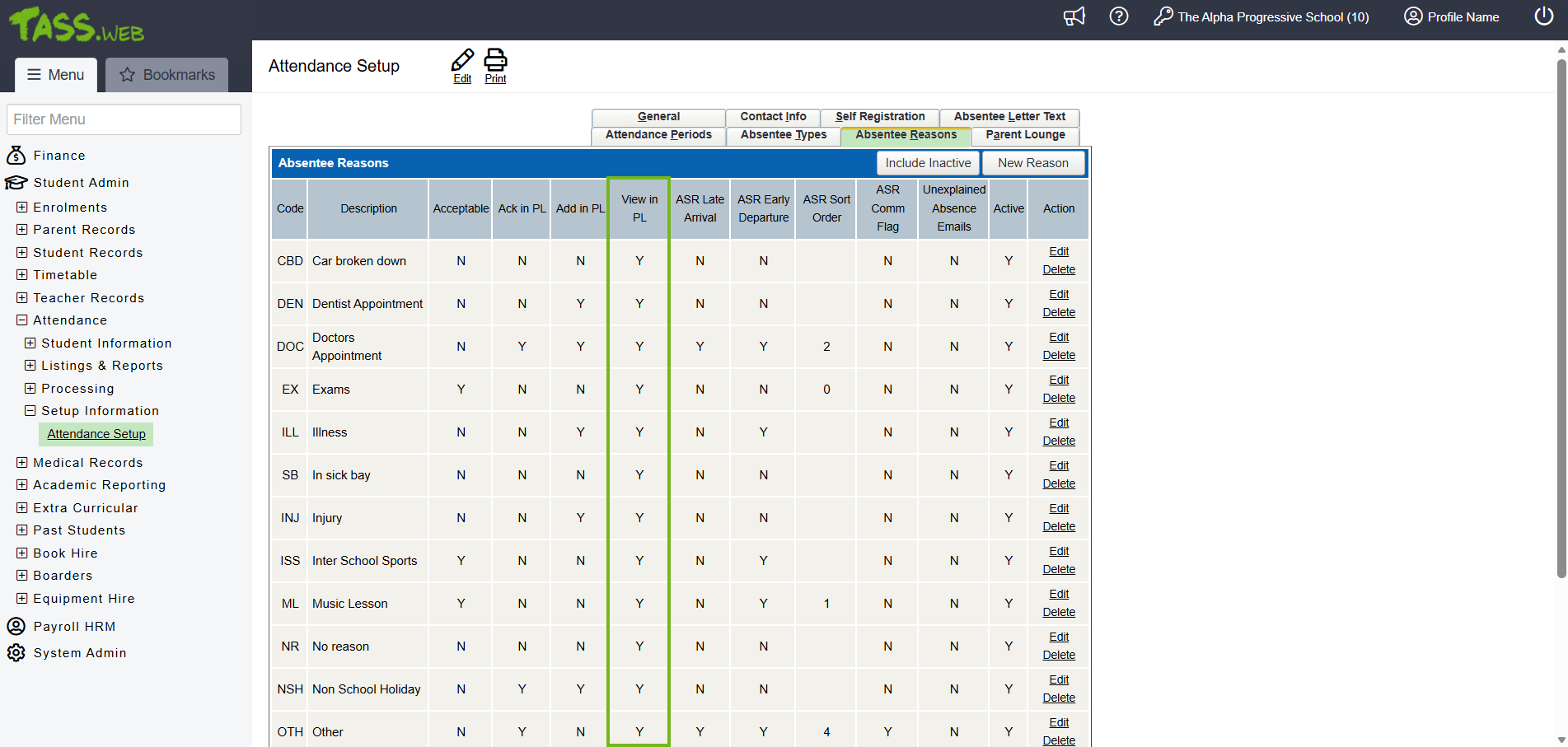 An image of the new ‘View in Parent Lounge' option on the ‘Add/Edit Absence Reasons’ screen: 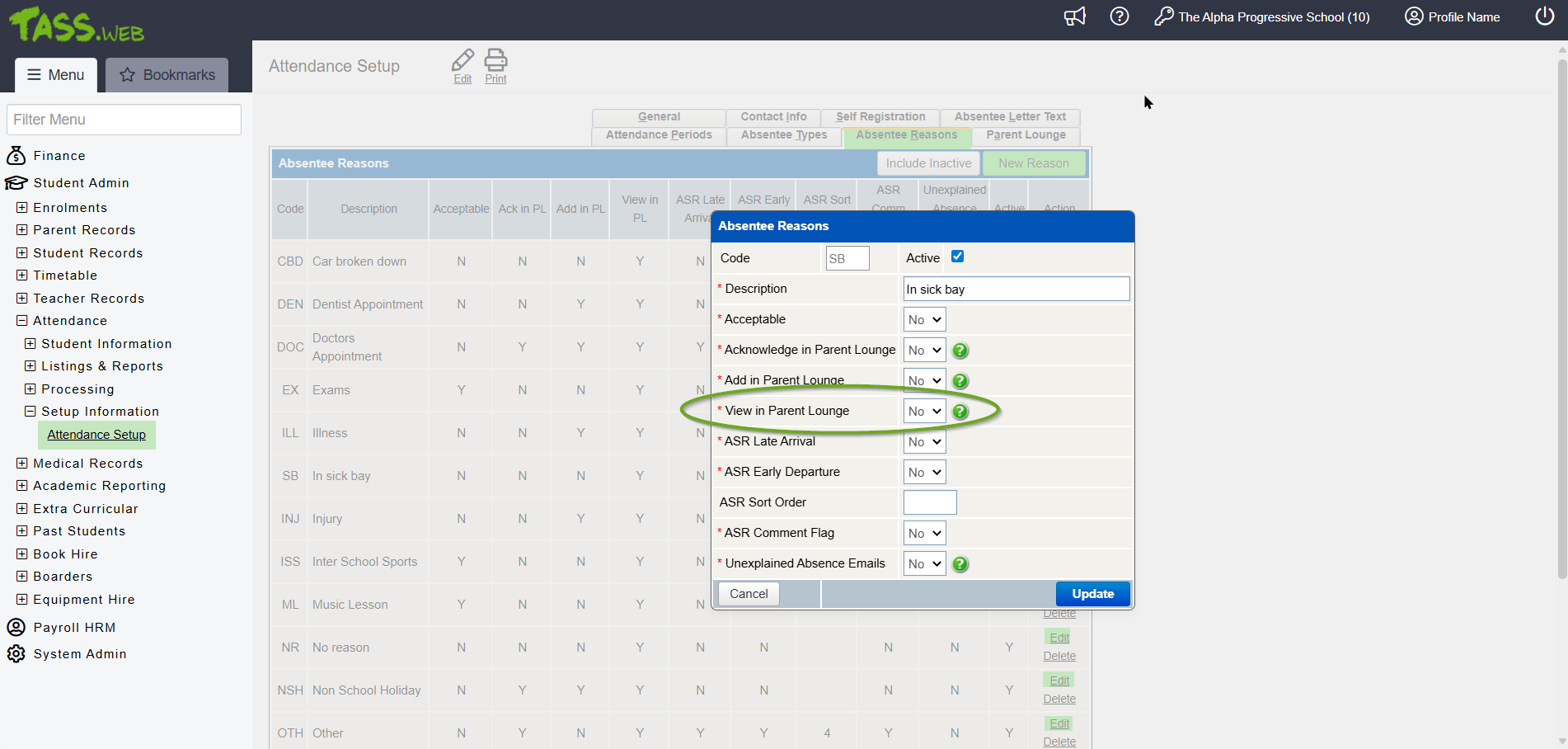 |
Student Orbit School Hour Lockout | A new 'Phone Lockout Setup' tab has been added to TASS.web System Admin > Orbit > Student Orbit Setup. The fields on this tab let schools configure days and times when the Student Orbit app is inaccessible to students, and set a message that appears when access is restricted. ^ Refer to the 'Student Orbit Setup' article on the TASS Knowledge Base for more information. An image of the new 'Phone Lockout Setup' tab for Student Orbit Setup: 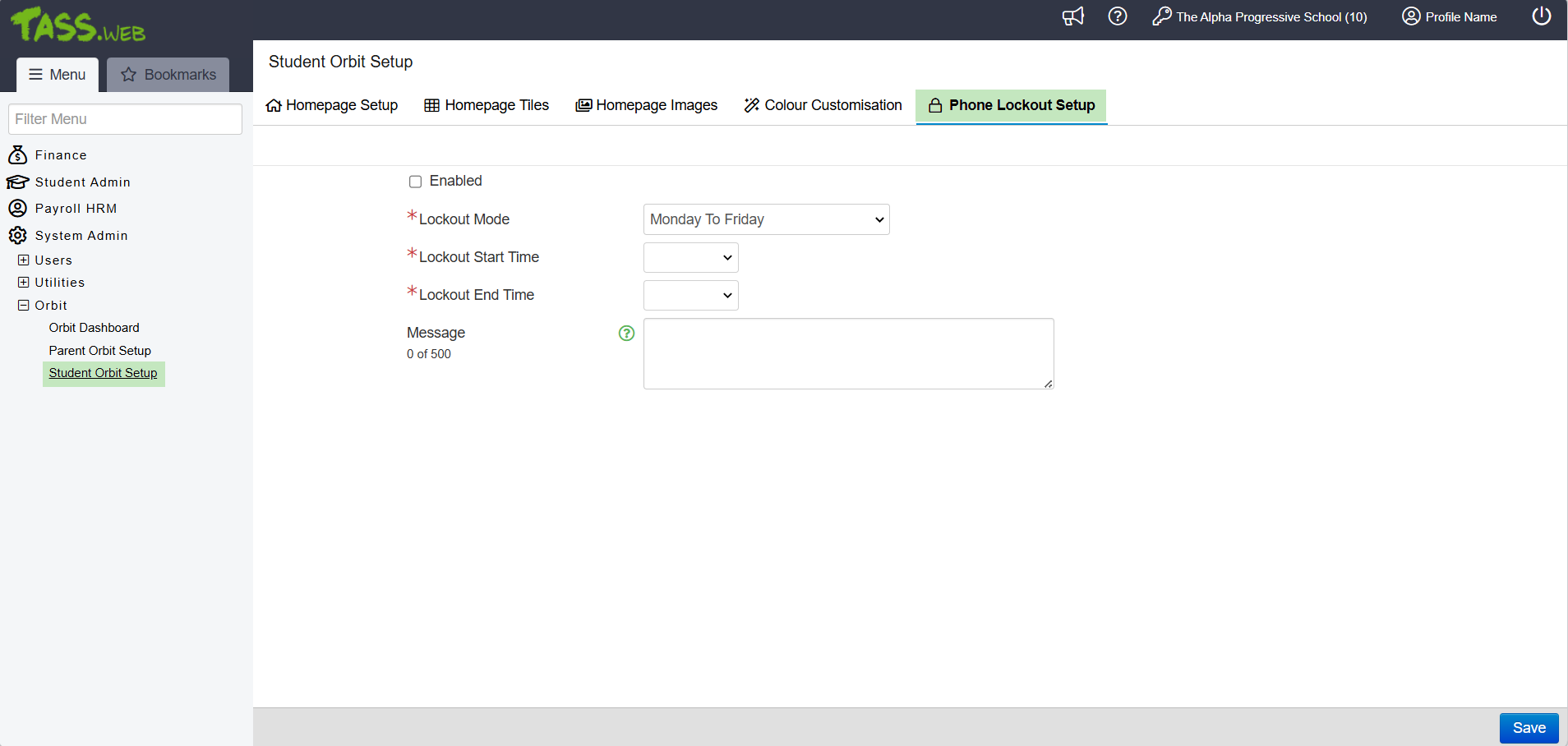 |
What's New?
Module | Menu | Details | Customer | Reference |
|---|---|---|---|---|
Parent Lounge > Student Details | Attendance | Enhancement to the Attendance History List. Student absence records are displayed or hidden based on the 'View in Parent Lounge' field settings for Absentee Reasons in TASS.web Student Admin > Attendance > Setup Information > Attendance Setup on the 'Absentee Reasons' tab. ^ | MIS01 | TASS-11796 |
Staff Kiosk > Assessment | Markbook Enter Results and Comments | Enhancement to Activity Setup > Assigned Activity > Edit. Update to ensure that changes to the 'Overwrite Max Result' field are reflected in all weighted calculations whenever the Activity appears on the Markbook Activity Assessment screen across multiple reporting periods. ^ | CAR02 | TASS-1260 |
Staff Kiosk > Home Page | Invoice Approvals | Enhancement to Staff Kiosk Home Page. A new 'Invoice Approvals to Action' section and side menu have been added, enabling users to view their pending invoice approvals with a link to access the 'Invoice Approvals' program. ^ | MIS01 | TASS-8773 |
Staff Kiosk > Staff | Invoice Approvals | Enhancement to the Staff menu. A new 'Invoice Approvals' program is available. User access is controlled by the 'Invoice Approvals' and '--Advance Approver' permissions in TASS.web System Admin > Users > Portal Security Permissions for Staff Kiosk. ^ | MIS01 | TASS-8212 |
Staff Kiosk > Payroll/HR | My Payroll/HR My Staff Leave/Other Application | Enhancement to Leave/Other Applications > New Application > Leave Application - Step 2 > Available as at dd/mm/yyyy. Update to ensure the ‘Less: Used by future dated Applications’ hours section is displayed in all scenarios. The calculation uses the date of the most recent pay run for the employee’s payroll number, which matches the date shown on the ‘Entitlement as at’ line. The calculation never returns a negative value, and dates within the first 12 days of a month remain in Standard Australian format. | MIS01 | TASS-10328 |
Staff Kiosk > Payroll/HR | My Payroll/HR My Staff Leave/Other Applications | Enhancement to Staff Calendar. The Leave Type of Other Applications now appears in the 'Summary' field of the calendar entry pop-up when the user has the '----View Other Leave Type on Calendar' permission. When granted this permission, users will see the exact Leave Type Description in the Summary field rather than just 'Other'. ^ | MIS01 | TASS-11380 |
Staff Kiosk > Staff | Invoice Approvals | Correction to Invoice Approvals > View/Edit. When no requisition is attached to the invoice, the Invoice Details section displays the line items from the TASS.web invoice. ^ | MIS01 | TASS-9894 |
Staff Kiosk > Staff | Invoice Approvals | Enhancement to Invoice Approvals > Edit. When a new assignee is added to an unpaid invoice, the system reviews the 'Assignee(s)' field upon saving, performs its validation checks, and sends an 'Invoice Approval has been assigned' email to any new assignees. ^ | MIS01 | TASS-8611 |
Staff Kiosk > Staff | Invoice Approvals | Enhancement to Invoice Approvals > View/Edit. The 'Invoice Details' screen includes a 'Save' button. When clicked, it submits the completed information to the database, updates the Status or Assignee, and creates audit logs. ^ | MIS01 | TASS-8240 |
Staff Kiosk > Staff | Invoice Approvals | Enhancement to Invoice Approvals > View/Edit. The 'Invoice Details' screen enables users to view invoice details in a read-only format and approve or reject invoices with goods or services. ^ | MIS01 | TASS-8235 |
Staff Kiosk > Staff | Invoice Approvals | Enhancement to Invoice Approvals > View/Edit. The 'Invoice Details' screen features a grid displaying the Purchase Orders line items associated with the invoice. ^ | MIS01 | TASS-8288 |
Staff Kiosk > Staff | Invoice Approvals | Enhancement to Invoice Approvals > View/Edit. The 'Invoice Details' screen features an 'Approval Details' section where users can review, approve, or reject invoices. This new section includes a dropdown for Status, a date/time field for Arrival Date, a text field for Comment, a multiple attachments upload area, and a searchable, multi-select list for Assignees or authorised personnel. ^ | MIS01 | TASS-8278 |
Staff Kiosk > Staff | Invoice Approvals | Enhancement to Invoice Approvals. A new database table has been introduced to link invoices to the approval process for goods or services. ^ | MIS01 | TASS-8234 |
Staff Kiosk > Staff | Invoice Approvals | Enhancement to Invoice Approvals. The 'Invoice Approvals Grid' displays the users assigned Invoices for Approval. ^ | MIS01 | TASS-8225 |
Staff Kiosk > Staff | Invoice Approvals | Enhancement to Invoice Approvals. The 'Invoice Approvals Grid' filters allow users to filter results in the grid by 'My Approvals/All Approvals' and 'Approval Status'. ^ | MIS01 | TASS-8226 |
Staff Kiosk > Staff | Invoice Approvals | Enhancement to Invoice Approvals. The 'Status' column uses the standard status indicator colours to represent the Invoice Approval status. ^ | MIS01 | TASS-11202 |
Staff Kiosk > Staff | Invoice Approvals | Enhancement to Invoice Approvals. Database tables have been modified to support the new Invoice Approvals workflow. ^ | MIS01 | TASS-8447 |
Staff Kiosk > Student Search | Student Profile | Enhancement to the 'Currently' button. When a student is at an appointment, non-teaching staff can now view the Appointment Type in the dropdown. | GEN01 | TASS-3892 |
TASS.web > Accounts Payable | Accounts Payable Setup | Enhancement to Accounts Payable Setup > 'Parameters' tab. A 'Staff Kiosk Pending Hold Type' and 'Staff Kiosk Rejected Hold Type' field have been added to enable administrators to specify which hold types will function as the 'Pending' and 'Rejected' statuses for Invoice Approvals. These fields are activated when the 'Use Hold Payments Processing' is set to ‘Yes’. ^ | MIS01 | TASS-8242 |
TASS.web > Accounts Payable | Invoices | Enhancement to the Accounts Payable Invoices program. Database tables have been modified to support the new Invoice Approvals workflow. ^ | MIS01 | TASS-8447 |
TASS.web > Accounts Payable | Invoices | Enhancement to Invoices > Edit. To edit the 'Hold Payment' field, the TASS.web user must have a Staff Kiosk user account with the correct permissions linked via TASS.web System Admin > User Maintenance on the 'Employee Mappings' tab. An alert appears if the user lacks this mapping. ^ | MIS01 | TASS-9210 |
TASS.web > Accounts Payable | Invoices | Enhancement to Invoices > Edit. Users can edit the 'Hold Payment' field for an invoice when they have the 'Edit' permission on the 'Invoices Hold Payment' permission point. ^ | MIS01 | TASS-8750 |
TASS.web > Accounts Payable | Invoices | Enhancement to Invoices > Edit. When a new assignee is added to an unpaid invoice, the system reviews the 'Assignee(s)' field upon saving, performs its validation checks, and sends an 'Invoice Approval has been assigned' email to any new assignees. ^ | MIS01 | TASS-8610 |
TASS.web > Accounts Payable | Invoices | Enhancement to Invoices > Edit/New. When a new assignee is added to an unpaid invoice, the system reviews the 'Assignee(s)' field upon saving, performs its validation checks, and adds a Notification to the Staff Kiosk Toolbar for any new assignees. ^ | MIS01 | TASS-8804 |
TASS.web > Accounts Payable | Invoices | Enhancement to Invoices > Edit/New. Upon clicking 'Save', the program validates the 'Assignee(s)' field, checks user permissions, and starts the new Invoice Approval workflow. An alert message appears if conditions are not met. ^ | MIS01 | TASS-8452 |
TASS.web > Accounts Payable | Invoices | Enhancement to Invoices > View/Edit. The 'Info' icon next to the 'Hold Payment' field has been replaced with a 'View Details' button and a new 'Invoice Approvals' screen for users to review approval details. ^ | MIS01 | TASS-8450 |
TASS.web > Accounts Payable | Invoices | Enhancement to Invoices > View/Edit. The 'View Details' button > 'Invoice Approval' screen features a history log for Invoice Approval to track changes and updates related to the approval process. ^ | MIS01 | TASS-8451 |
TASS.web > Accounts Payable | Invoices | Enhancement to Invoices > View/Edit. The 'View Details' button is found next to the 'Hold Payment' field. Clicking it opens the 'Invoice Approvals' screen, where you can view the audit log workflow history of an invoice's approval process. ^ | MIS01 | TASS-8449 |
TASS.web > Accounts Payable | Invoices | Enhancement to Invoices > View/Edit. The 'View Details' screen uses the standard status indicator colours to represent the Invoice Approval status. ^ | MIS01 | TASS-11302 |
TASS.web > Accounts Payable | Invoices | Enhancement to Invoices > View/Edit. Update the user interface to ensure that the details in the 'General Ledger Grid' remain visible when there are multiple assignees. ^ | MIS01 | TASS-9051 |
TASS.web > Accounts Payable | Invoices | Enhancement to Invoices > View/Edit. The 'View Details' screen shows the change log history of updates to the 'Hold Payment Flag' in TASS.web, specifically when it changes from 'Staff Kiosk Pending Hold Type' or 'Staff Kiosk Rejected Hold Type' to 'Do Not Hold Payment'. ^ | MIS01 | TASS-9866 |
TASS.web > Accounts Payable | Invoices | Enhancement to Invoices > View/Edit/New. The 'Assignee(s)' field lets users assign Invoice Approvers to the Staff Kiosk workflow. It is only accessible when the 'Hold Payment' field matches the chosen Hold Type for 'Staff Kiosk Pending Hold Type' or 'Staff Kiosk Rejected Hold Type' fields in TASS.web Accounts Payable Setup. The field is automatically populated with the Requisition Form requestor if they have the 'Invoice Approvals' or '--Advanced Approver' user security permissions. ^ | MIS01 | TASS-8448 |
TASS.web > Accounts Payable | Invoices | Enhancement to Invoices > View/Edit/New. To view the 'Assignee(s)' field, users must have their TASS.web User Account mapped to a Staff Kiosk User Account with the appropriate User Permissions. ^ | MIS01 | TASS-9209 |
TASS.web > Accounts Payable | Invoices | Enhancement to Invoices. When the 'Daily Reminder - Invoice Approvals Pending Action' email is sent out, the assignee also receives a notification in their Staff Kiosk Toolbar. ^ | MIS01 | TASS-8805 |
TASS.web > Attendance | Attendance Setup | Enhancement to Attendance Setup > Absentee Reasons tab. A new 'View in PL' column has been added to the Absentee Reasons grid to summarise which reasons have the 'View in Parent Lounge' flag enabled. ^ | MIS01 | TASS-11794 |
TASS.web > Attendance | Attendance Setup | Enhancement to Attendance Setup > Absentee Reasons tab > New Reason/Edit. A new 'View in Parent Lounge' field has been added. When set to 'Yes' and the Absentee Type 'View in Parent Lounge' flag is also set to 'Yes', student absence records will be visible in the Attendance History areas of Parent Lounge and Parent Orbit. ^ | MIS01 | TASS-11794 |
TASS.web > Extra Curricular | Extra Curricular Setup | Enhancement to Extra Curricular Setup > Activities tab > View/Edit > Activity Details. A new 'Display When Not Assigned' checkbox has been added to the 'Portal Details' section. When this checkbox is ticked, the activity will appear in the Extra Curricular Hub in Orbit products for students when they are not assigned to the Activity. ^ | MIS01 | TASS-9690 |
TASS.web > Orbit | Parent Orbit Setup | Enhancement to the Parent Orbit Setup > Homepage Tiles tab > Add Tile/Edit. A new target feature has been added for 'Medications'. When configured, it allows Medications to appear as a tile on the Parent Orbit app homepage. ^ | MIS01 | TASS-10632 |
TASS.web > Orbit | Student Orbit Setup | Enhancement to Student Orbit Setup > Homepage Setup tab. A new homepage element for 'Quick Links' has been added to display Quick Links on the Student Orbit app homepage. The 'Tile Grid' element has been renamed 'Homepage Grid'. ^ | MIS01 | TASS-11658 |
TASS.web > Orbit | Student Orbit Setup | Enhancement to Student Orbit Setup > Phone Lockout Setup tab. A new 'Phone Lockout Setup' tab has been added to let schools configure whether access to the Student Orbit app should be restricted during school hours. ^ | MIS01 | TASS-11480 |
TASS.web > Student Records | Upload Testing Data | Enhancement to Upload Testing Data > Test Type: PAT Comprehension, PAT Maths, PAT Reading and PAT Spelling. The expected data type has been updated from integer to decimal to allow PAT testing results with decimal places. | LIG02 | TASS-10561 |
TASS.web > Users | Portal Security Permissions | Enhancement to Portal Security Permissions for Staff Kiosk. A new '----View Other Leave Type on Calendar' permission enables staff to view the Leave Type Description of Other Applications in Staff Kiosk Payroll/HR > My Payroll/HR > Staff Calendar and Staff Kiosk Payroll/HR > My Staff Leave / Other Applications > Calendar. ^ | MIS01 | TASS-11379 |
TASS.web > Users | Portal Security Permissions | Enhancement to User Security Permissions for Staff Kiosk. The 'Invoice Approvals' permission gives Staff Kiosk users the ability to validate received goods/services and access invoice approvals. The '--Advance Approver' permission grants staff access to all invoices needing approval for the delivery of goods/services. ^ | MIS01 | TASS-8212 |
TASS.web > Utilities | API Endpoint Maintenance | Enhancement to API Endpoint Maintenance. A new API audit logs and analytics dashboard has been introduced. Administrators can now review API audit logs and view statistics on user and endpoint activity, including Recent Errors, Top Users, and Top Endpoints. | MIS01 | TASS-10851 |
TASS.web > Utilities | API Gateway Maintenance | Enhancement to External APIs > LISS Integration. The 'publishDailyDeltas' endpoint now excludes teacher substitution records cancelled in TASS.web. | MIS01 | TASS-11351 |
TASS.web > Utilities | API Gateway Maintenance | Enhancement to External APIs > LISS Integration. A new 'Include Rostered Time Off' checkbox and 'Default Rostered Time Off Room Code' field have been added to the LISS Integration Gateways screen, for users to include staff members' rostered time off in the TASS timetable and to select their preferred default room code for these entries. | MIS01 | TASS-11390 |
TASS.web > Utilities | API Gateway Maintenance | Enhancement to External APIs > LISS Integration. The 'publishDailyDeltas' endpoint now supports multiple Teacher Codes in a single request for classes with more than one teacher. | MIS01 | TASS-11353 |
TASS.web > Utilities | API Gateway Maintenance | Enhancement to External APIs > LISS Integration. When the 'Include Rostered Time Off' checkbox is selected, the system assigns the 'Default Rostered Time Off Room Code' to any RTO records without a room code during the LISS synchronisation process. | MIS01 | TASS-11392 |
TASS.web > Utilities | API Gateway Maintenance | Enhancement to External APIs > Orbit Parent Push Notifications. Improved the processing time for bulk push notifications by updating to the Firebase Admin SDK method. ^ | MIS01 | TASS-11403 |
TASS.web > Utilities | API Gateway Maintenance | Enhancement to OAuth2 API Applications > Orbit Parent. A new 'Get PTI Room Attachment (getPtiRoomAttachment)' OAuth Scope API endpoint has been introduced to make Parent Teacher Interview-related room attachments visible from the Parent Orbit app. ^ | TORR01 | TASS-11676 |
TASS.web > Utilities | API Gateway Maintenance | Enhancement to OAuth2 API Applications > Orbit Parent. The 'Student Attendance History (getAttendance History)' OAuth Scope API endpoint has been updated to consider the new Absentee Reason 'View in Parent Lounge' flag. ^ | MIS01 | TASS-11795 |
TASS.web > Utilities | API Gateway Maintenance | Enhancement to OAuth2 API Applications > Orbit Parent. The 'Student Extra Curricular (getExtraCurricular)' OAuth Scope API endpoint has been updated to return all activities for which the parents’ students are not assigned for the current year when the 'Display When Not Assigned' checkbox is selected. ^ | MIS01 | TASS-9693 |
TASS.web > Utilities | API Gateway Maintenance | Enhancement to OAuth2 API Applications > Orbit Parent. The 'PTI Booking Appointments (getPtiBookingAppointments)' OAuth Scope API endpoint has been updated to include PTI Room-related attachments. ^ | MIS01 | TASS-11675 |
TASS.web > Utilities | API Gateway Maintenance | Enhancement to OAuth2 API Applications > Orbit Staff. The 'Staff Extra Curricular Details (getStaffECGDetails)' OAuth Scope API endpoint has been updated to include Portal Details from TASS.web Student Admin > Extra Curricular > Setup Information > Extra Curricular Setup on the 'Activities' tab. ^ | MIS01 | TASS-11841 |
TASS.web > Utilities | API Gateway Maintenance | Enhancement to OAuth2 API Applications > Orbit Staff. The 'Staff Notifications (getStaffNotifications)' OAuth Scope API endpoint has been updated to include Created By and Pastoral Care Flag data. ^ | MIS01 | TASS-9862 |
TASS.web > Utilities | API Gateway Maintenance | Enhancement to OAuth2 API Applications > Orbit Staff. The 'RollCall (getRollcall)' OAuth Scope API endpoint has been updated to include Student Check In and Check Out details. ^ | MIS01 | TASS-11315 |
TASS.web > Utilities | API Gateway Maintenance | Enhancement to OAuth2 API Applications > Orbit Student. The 'API Setup Details (getAPISetupDetails)' OAuth Scope API endpoint has been updated to include Phone Lockout configurations from the Student Orbit Setup program. ^ | MIS01 | TASS-11506 |
TASS.web > Utilities | API Gateway Maintenance | Enhancement to OAuth2 API Applications > Orbit Student. The 'Student Extra Curricular (getExtraCurricular)' OAuth Scope API endpoint has been updated to return all activities for which the students are not assigned for the current year when the 'Display When Not Assigned' checkbox is selected. ^ | MIS01 | TASS-9693 |
TASS.web > Utilities | Email Settings | Enhancement to Email Settings > System Email Templates. A new 'Invoice Approval has been assigned' email template is sent to approvers when an invoice is saved and a new user is assigned. A 'Daily Reminder - Invoice Approvals Pending Action' template is sent daily at the specified time to remind approvers of pending invoices. Both templates can be made active or inactive and customised if required. ^ | MIS01 | TASS-8369 |
TASS.web > Utilities | Email Settings | Enhancement to Email Settings > System Email Templates. Database updates have been made to enable scheduled email reminders for the Invoice Approvals workflow, allowing users to choose the send time. ^ | MIS01 | TASS-8499 |
TASS.web > Utilities | Email Settings | Enhancement to Email Settings > System Email Templates. Keywords for invoice approvals are available for templates in the 'Invoice Approvals (INVAPP)' category. ^ | MIS01 | TASS-8373 |
TASS.web > Utilities | Email Settings | Enhancement to Email Settings > System Email Templates. Keywords for invoice approvals are displayed in alphabetical order by label. ^ | MIS01 | TASS-8609 |
TASS.web > Utilities | Email Settings | Enhancement to Email Settings > System Email Templates. The 'Daily Reminder - Invoice Approvals Pending Action' template includes a 'Save' button. Upon clicking 'Save', the program validates the 'Send Email At' field. An alert message appears if conditions are not met. ^ | MIS01 | TASS-8512 |
TASS.web > Utilities | Email Settings | Enhancement to Email Settings > System Email Templates. The 'Daily Reminder - Invoice Approvals Pending Action' template includes a 'Send Email At' field, allowing users to select the time at which emails are sent to approvers. ^ | MIS01 | TASS-8501 |
TASS.web > Utilities | Email Settings | Enhancement to Email Settings > System Email Templates. The 'Daily Reminder - Invoice Approvals Pending Action' template includes 'Invoice Approval Keywords' for 'Accounts Payable Contact' and 'Table of Pending Invoices to Approve'. ^ | MIS01 | TASS-8926 |
TASS.web > Utilities | Email Settings | Enhancement to Email Settings > System Email Templates. A new email templates category has been added for 'Invoice Approvals (INVAPP)'. ^ | MIS01 | TASS-8372 |
TASS.web > Utilities | Email Settings | Enhancement to Email Settings > System Email Templates. The 'Daily Reminder – Invoice Approvals Pending Action' email has been added to the Master Scheduled task to notify staff of overdue or due invoices. It is sent at the time specified in the 'Send Time At' field. ^ | MIS01 | TASS-8606 |
TASS.web > Utilities | Email Settings | Enhancement to Email Settings > System Email Templates. When the 'Deep link to the approval modal' keyword is added to a template, the text 'Link to Approve Invoice’ will appear for the recipient. When clicked, it will open the Staff Kiosk 'Invoice Approvals' screen, provided the user is logged in and has the correct security permissions. ^ | MIS01 | TASS-8518 |
TASS.web > Utilities | Email Settings | Enhancement to Email Settings. Database tables have been updated to support the tracking and scheduling of invoice approval email templates. ^ | MIS01 | TASS-8751 |
Corrections
Module | Menu | Details | Customer | Reference |
|---|---|---|---|---|
Parent Lounge > Accounts & Payments | Events and Payments | Enhancement to Events and Payments in Parent Lounge. When paying for an event, the 'Receipt Email' field no longer expands to fit the width; it now wraps to additional lines within the container. | MIS01 | TASS-9379 |
Staff Kiosk > Assessment | Markbook Enter Results and Comments | Correction to the Activity Assessment screen > Final Results Hamburger Menu > Calculate Results. The Final Results calculations consider objectives from earlier periods if the Calculation Rule has 'Include Past Periods' set to Yes, and the objective is present in past-period activities but absent from current-period activities. | CEO01 | TASS-9600 |
Staff Kiosk > Home Page | My Substitutions | Correction to My Substitutions. Invalid date strings have been corrected to minimise Oops! errors in the exception log. | KIN02 | TASS-11394 |
Staff Kiosk > Rollcall | Custom Rolls | Correction to Custom Rolls > Edit > Edit Custom Roll screen. The 'Assign Admin Rights' field retains its value upon Save when the Custom Roll is linked to Extra Curricular Sessions/Fixture. | CAR02 | TASS-11873 |
Staff Kiosk > Staff | Budgets | Correction to Budgets > 'Committed C' column hyperlink > Budget Information screen. The Purchase Order 'Print' icon has been fixed, allowing users to generate a print preview or a printable version of the purchase order. | KIN02 | TASS-10991 |
Staff Kiosk > Staff | Invoice Approval | Correction to Invoice Approvals. When no requisition is attached to the invoice, the Invoice Details section displays the line items from the TASS.web invoice. | MIS01 | TASS-9894 |
Staff Kiosk > Staff | Learning Support | Correction to Learning Support > Support Plan Grid > Bulk Actions > Copy Class Plans. After bulk copying Class Plans, automated emails are sent to teachers' school email addresses. | IPS02 | TASS-3717 |
TASS.web > Accounts Payable | Auto Payments | Correction to Auto Payments > Create. Update to ensure that Auto Payment Runs can be created successfully and that the screen does not time out after clicking the final Save button. | MIS01 | TASS-11856 |
TASS.web > Accounts Payable | Invoices | Correction to the Accounts Payable > Invoices program to ensure users who do not have Staff Kiosk employee mapping can still save invoices if the Staff Kiosk Invoice Approvals process is not enabled (indicated by the 'Staff Kiosk Pending Hold Type' and 'Staff Kiosk Rejected Hold Type' fields being empty in Accounts Payable Setup). ^ | MIS01 | TASS-12000 |
TASS.web > Accounts Payable | Post Period Activity | Correction to Post Period Activity to ensure the program runs post-period activity successfully without encountering a white screen. | FUR01 | TASS-11014 |
TASS.web > Enrolments | Enrolment Details Listing | Correction to Enrolment Details Listing. Updated to ensure the exported file reflects the current UD field values for the parent record when 'Student-based Listing with Addresses (Excel Only)' is selected as the report option and the parent record has both a current and enrolled parent record. | RED20 | TASS-11669 |
TASS.web > General Ledger | Accounts | Correction to Accounts > Ledger tab. When the 'Actual' amount hyperlink is selected, the Journal Details screen now displays only the first 1000 rows and shows '#### Record/s Found... Only the first 1000 records displayed' to improve program performance and load times. | ALL03 | TASS-11404 |
TASS.web > General Ledger | Journals | Correction to Journals > View > Journal Details. For large journals, the 'General Ledger Grid' section displays the first 1000 rows and shows '#### Record/s Found... Only the first 1000 records displayed' to improve program performance and load times. | MIS01 | TASS-11465 |
TASS.web > Parent Accounts | EP Processing & Updates from PL | Correction to EP Processing & Updates from PL 'Updates from Parent Lounge' notification. This notification excludes paid deposits to protect bank information related to refunds that have already been processed. Only refund vouchers for unpaid deposits are shown. | STA08 | TASS-11381 |
TASS.web > Utilities | API Gateway Maintenance | Correction to OAuth2 API Applications > Parent Orbit. The 'Extra Curricular Fixtures (getFixture)' OAuth Scope API endpoint has been updated to ensure that all of the parents' students who are members of the same activity, regardless of the session’s activity level, appear when sessions are assigned to 'All Teams / Levels'. ^ | CAN002 | TASS-10713 |
TASS.web > Utilities | API Gateway Maintenance | Correction to OAuth2 API Applications > Staff Orbit. The 'Events Information (getEvents)' OAuth Scope API endpoint has been updated to prevent an internal server error when a school has more non-current employees than current employees. ^ | SWA01 | TASS-11830 |
TASS.web > Utilities | API Gateway Maintenance | Correction to OAuth2 API Applications > Staff Orbit. The 'RollCall (getRollcall)' OAuth Scope API endpoint has been updated to ensure that student absence information is returned for all students in multi-year-level class groups. ^ | ROS01 | TASS-11997 |
TASS.web > Utilities | API Gateway Maintenance | Correction to TASS APIs > Add API Application. Update to ensure the 'Generate' button successfully generates API token keys that can be used to connect to the API without error. | MIS01 | TASS-11583 |