
v01.2026.04.200
This page documents the official TASS Release Notes for software version v01.2026.04.200, including new features and corrections.
Use this page to review all features, enhancements, and fixes included in this release.

The Friendly Release allows ‘Friendly Schools’ to trial new features and provide feedback before the General Release. Occasionally, additional updates and fixes are included between these two release dates. A caret symbol (^) signifies features that are only available in the General Release version.
Major Items
Module | Details |
|---|---|
New API Endpoints for Student Medical Records | New TASS REST API endpoints have been introduced to enable API Endpoint Users to create, retrieve, update, and delete student illness/daily log records from TASS.web Student Admin > Medical Records. Refer to https://api.developer.tassweb.com.au/ and select version '2026.04' for more information. |
NAB Unified Checkout Card Network Icons | The NAB Unified Checkout Payment Gateway API now allows users to select which card network icons appear in the ‘Cards We Accept' section of the 'Pay Now’ pop-up in Parent Lounge and the Commercial Debtors Online Payments Portal. Refer to Step 5 of the 'How to Set Up the NAB Payment Gateway (Unified Checkout)' article on the TASS Knowledge Base for details. |
Extra Curricular Fixture - Assign Admin Rights | When creating a Custom Roll for an Extra Curricular Activity, the 'Assign Admin Rights' field now automatically pre-fills with 'Activity Coordinators' and 'Extra Curricular Activity Group Team / Level Staff’ (such as coaches) where relevant. Refer to the 'Scheduling Extra Curricular Sessions and Fixtures' article on the TASS Knowledge Base for more information. An image of the Assign Admin Rights field on the Create Custom Roll screen. 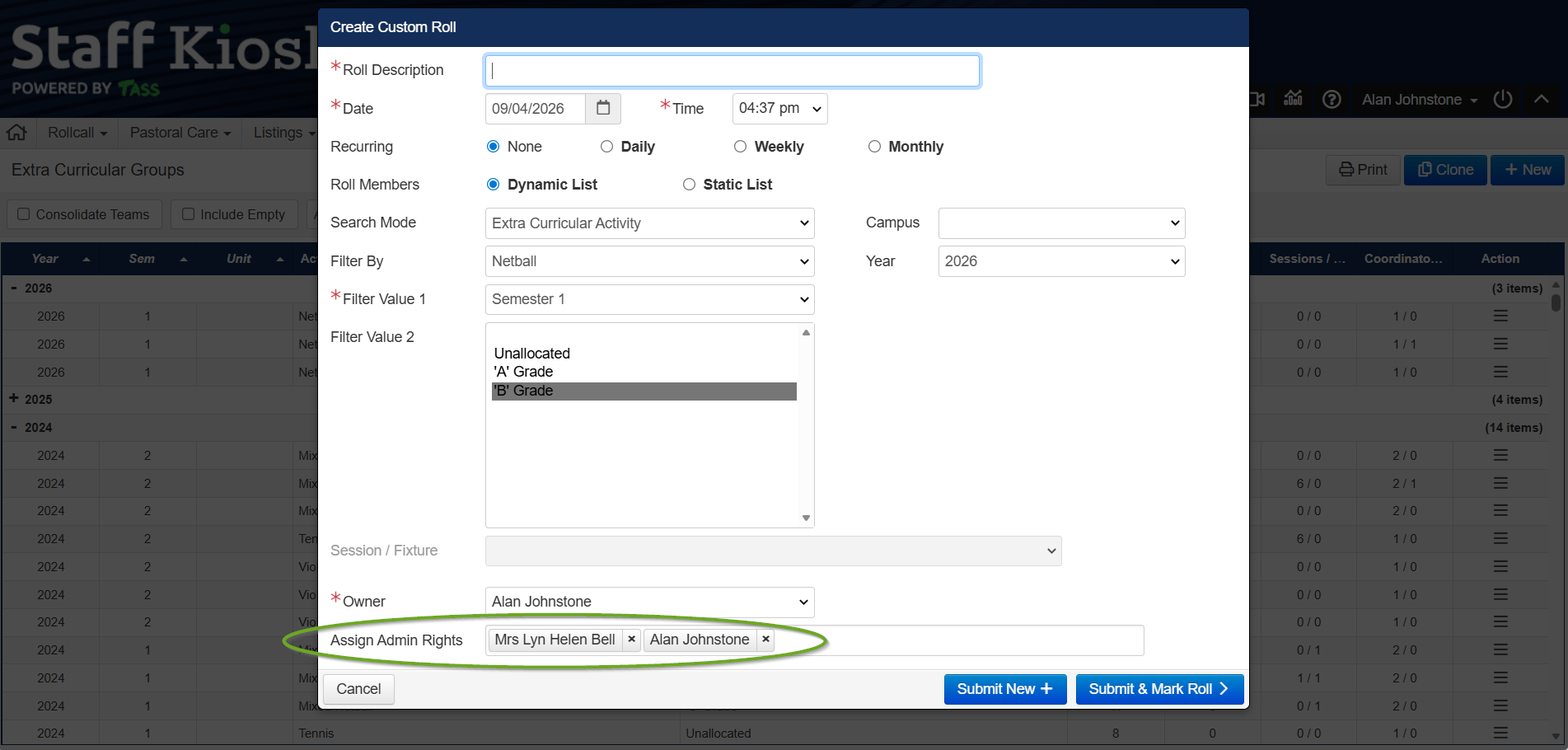 |
Overall Subject Grades Calculated from Activity Total Scores | A new 'Method 4' for Overall Subject Grade Calculation has been added to the Staff Kiosk Markbook 'Activity Assessment' screen. This new method calculates grades based on the average of Activity Total Scores. Refer to the 'Markbook - Enter or Calculate Overall Subject Grades' article on the TASS Knowledge Base for more information. An image of the new ‘Method 4’ Calculation Method on the Calculations Rules screen in Markbook > Activity Assessment. 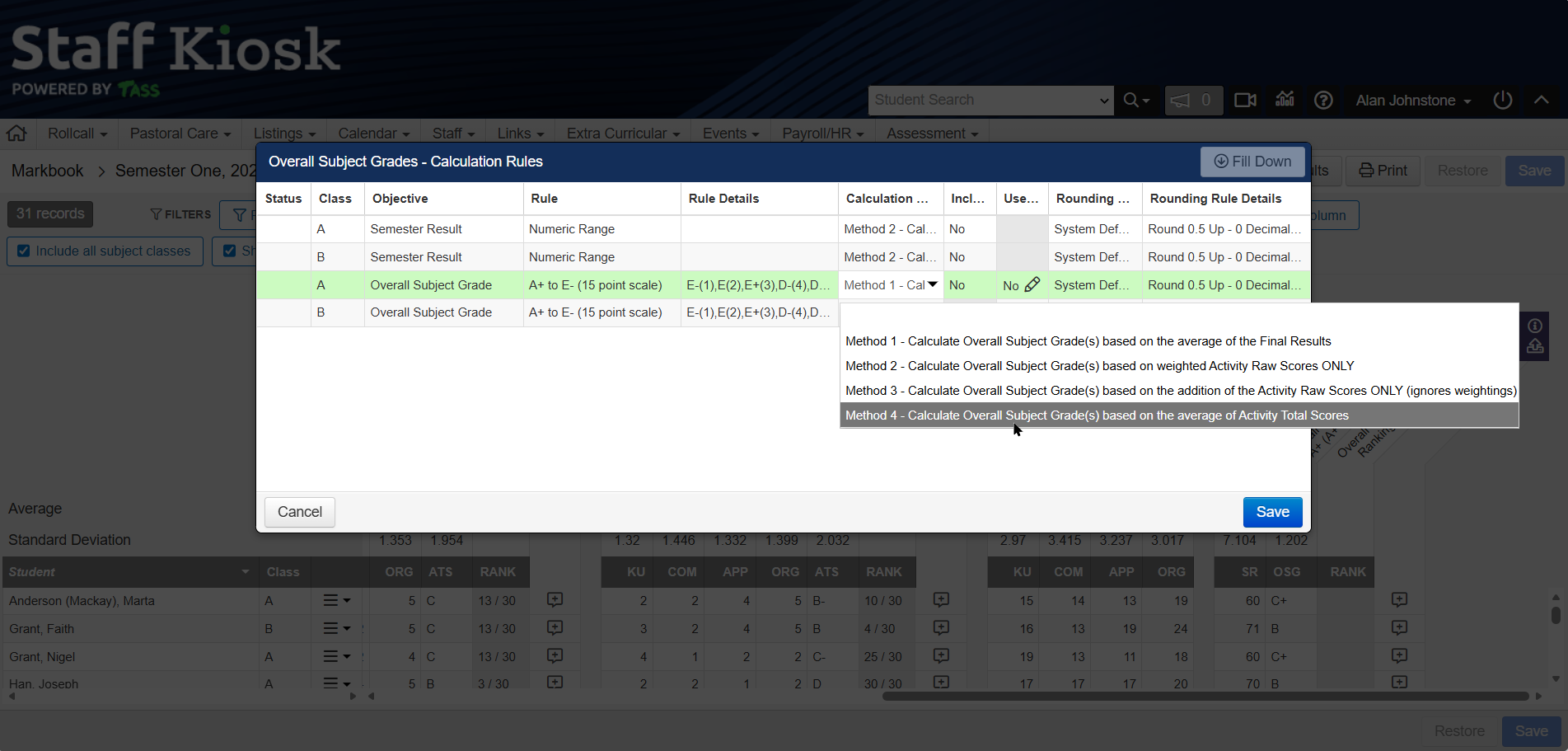 |
Leave Applications - Reminder Emails | Automated email templates can now be configured for leave application reminders in TASS.web System Admin > Utilities > Email Settings on the ‘System Email Templates’ tab. Users can set reminder emails based on days since the employee submitted the leave application, since the approver received it, before the first day of leave, or since the draft leave application was created. Refer to the 'How to Setup Staff Kiosk Leave Applications' article on the TASS Knowledge Base for details. An image of the new leave reminders system email templates in the Email Settings program: 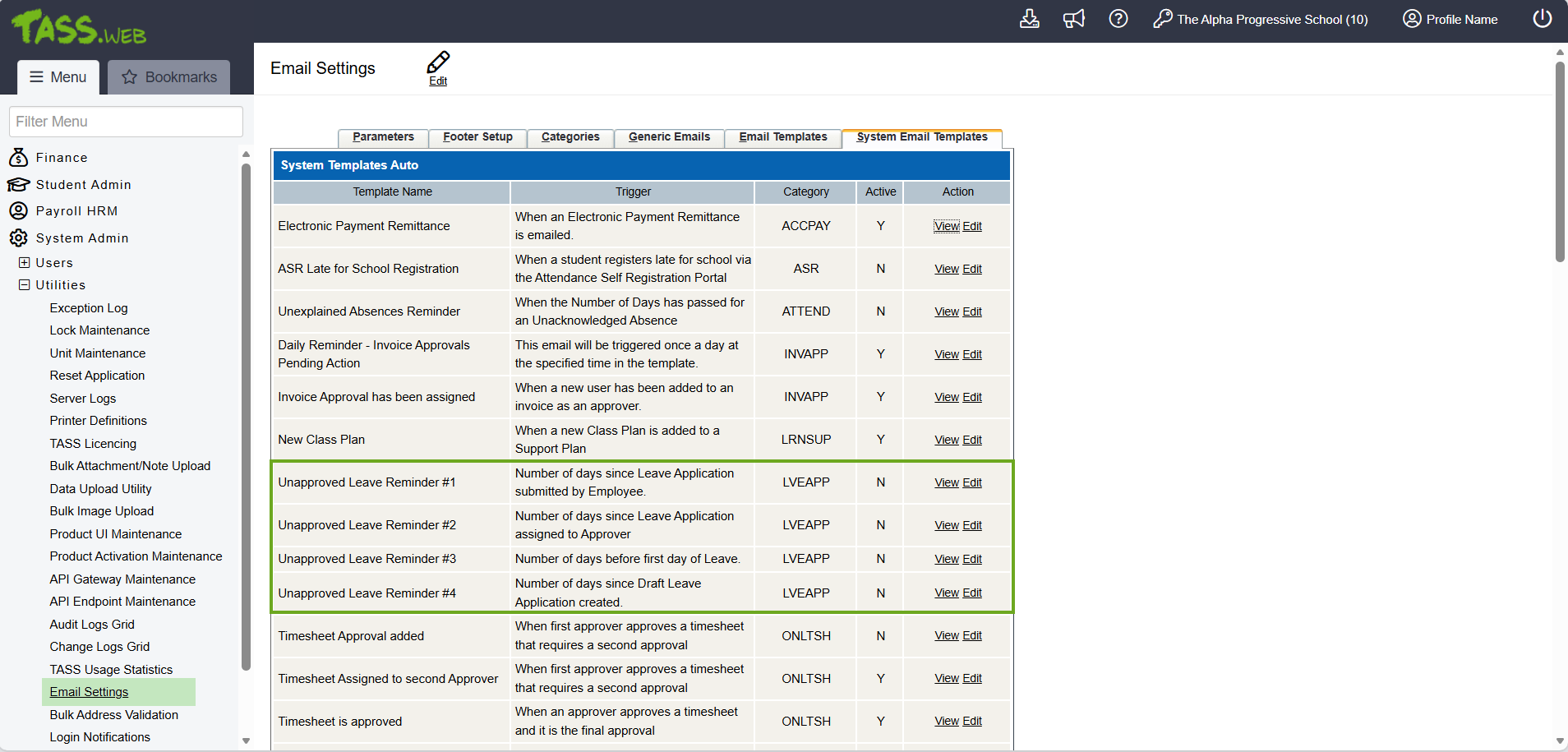 |
Attendance API - Attachments | New TASS REST API endpoints have been introduced to enable API Endpoint Users to list and download student attendance-related attachments. Refer to https://api.developer.tassweb.com.au/ and select version '2026.04' for more information. |
Student Orbit - Pastoral Care Enhancements ^ | Pastoral Care Entries (PC Entries) can now link to Extra Curricular Activity Teams or Levels, be flagged for medical-related concerns, and be viewed by students from the Student Orbit app. Schools can nominate the Pastoral Care Type linked to extra-curricular activities and control Student Orbit app visibility via Staff Kiosk Pastoral Care > Types (Setup) and Staff Kiosk Pastoral Care > Conducts (Setup). The Pastoral Care Entry screen now includes an ‘EC Activity’ field that appears when the Extra Curricular–flagged ‘Pastoral Care Type’ is selected, allowing users to select the Extra Curricular Activity Teams and Levels related to the PC Entry. The screen also includes a ‘Medical Concern’ checkbox and fields for ‘Severe’ and ‘Medical Condition’ to provide additional information when reporting medical issues, and a ‘Location’ field to enter the location where the incident occurred. When a new PC Entry has the 'Medical Concern' checkbox selected, the school's medical centre staff receive the 'Pastoral Care Medical Concern' email template. This template can be customised in TASS.web System Admin > Utilities > Email Settings under 'System Email Templates.' ^ Refer to the 'How to Setup Staff Kiosk Pastoral Care' article on the TASS Knowledge Base for more information. An image of the new ‘EC Activity’, ‘Medical Concern', ‘Severe’ and ‘Medical Condition’ fields on the ‘Pastoral Care Entry’ screen in the Staff Kiosk ‘PC Entries’ program: 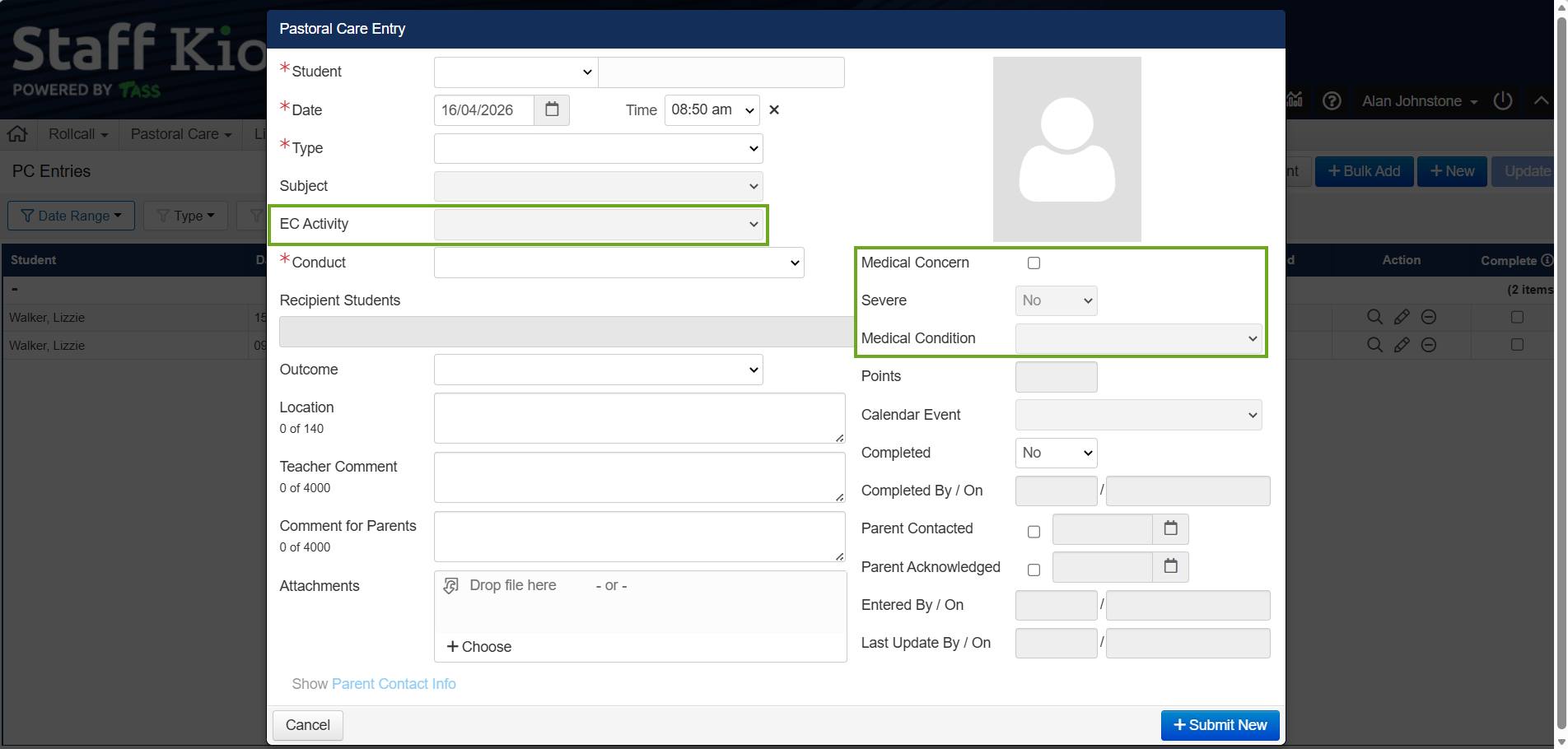 An image of the new ‘Extra Curricular Flag' and ‘View in Student Orbit’ options in the Staff Kiosk ‘Types (Setup)’ program: 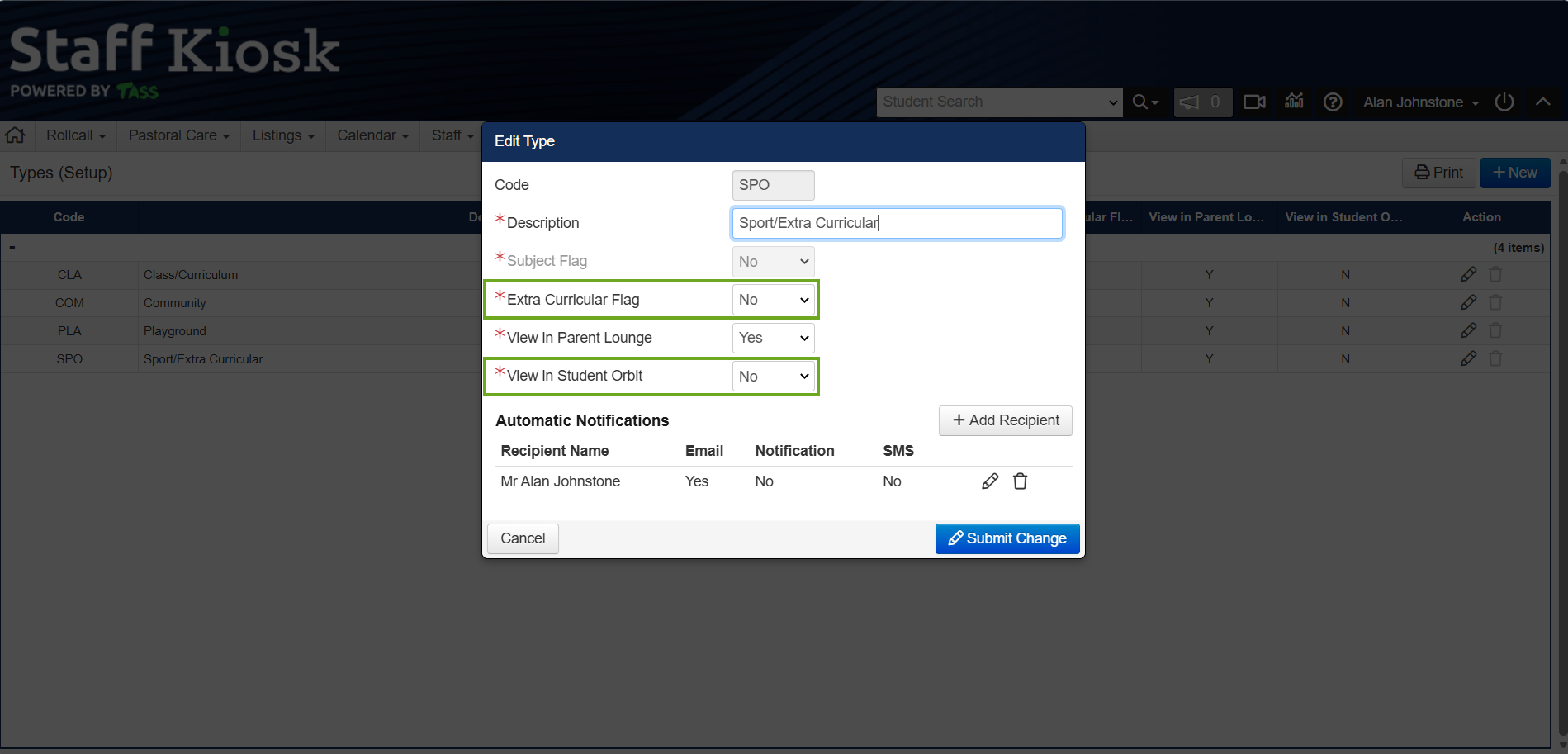 An image of the new ‘View in Student Orbit’ option in the Staff Kiosk ‘Conduct (Setup)’ program: 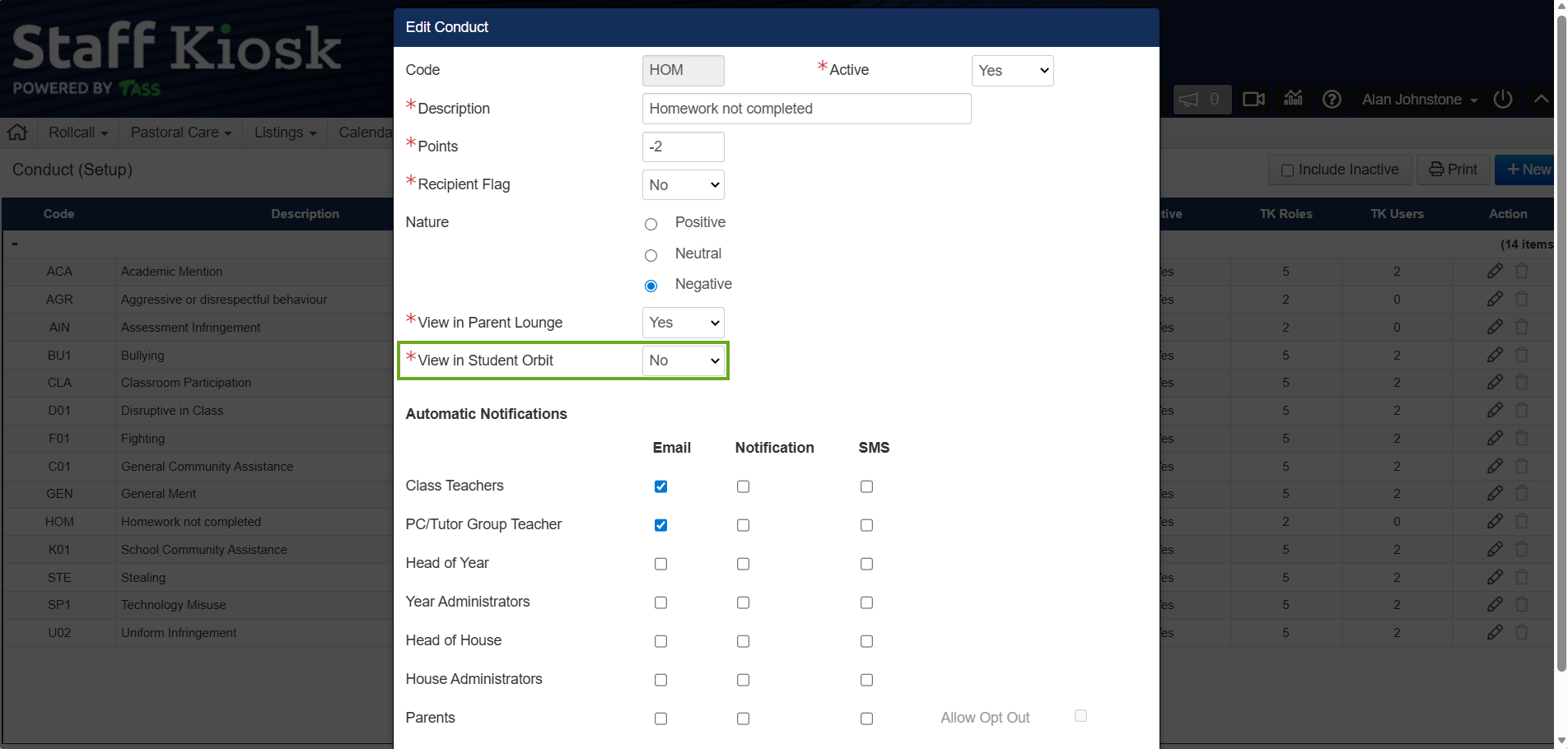 An image of the new ‘Pastoral Care Medical Concern’ System Email Template in the TASS.web ‘Email Settings’ program: 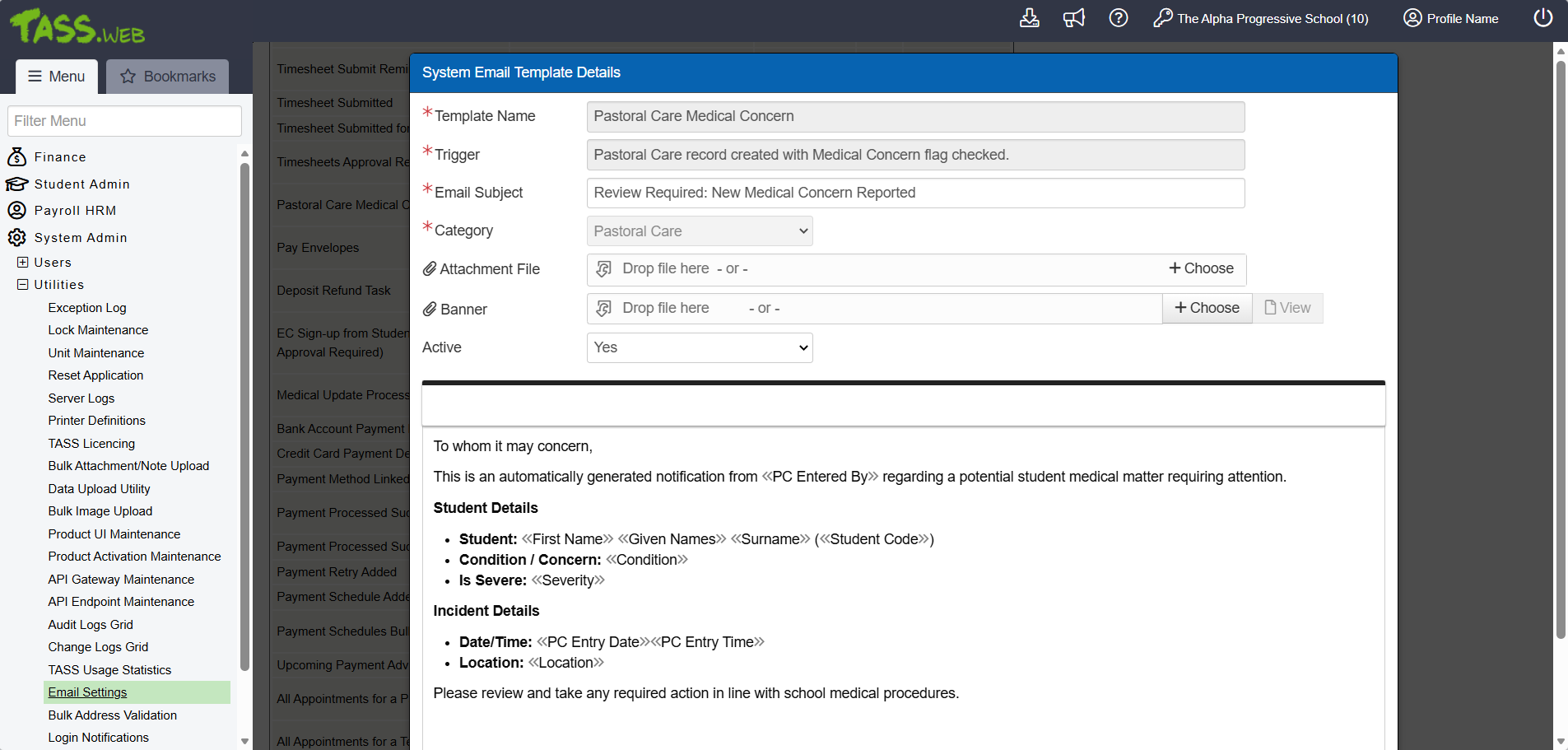 |
Staff Orbit - Pay Envelopes ^ | The API Gateway Maintenance program includes new OAuth2 endpoints that enable staff to access Pay Envelopes via the Staff Orbit app. ^ |
Student Orbit - Extra Curricular Signups ^ | The API Gateway Maintenance program includes new OAuth2 endpoints that enable students to sign up to Extra Curricular Activities via the Student Orbit app. ^ |
What's New?
Module | Menu | Details | Customer | Reference |
|---|---|---|---|---|
Commercial Debtors Online Payments Portal | Commercial Debtors Online Payments Portal | Enhancement to Payment Portals > Pay Now screen. When the NAB Unified Checkout payment gateway is set up, the 'Cards We Accept' section only shows the card network icon selected in the 'Accepted Card Networks' field within the payment gateway configuration in TASS.web System Admin > Utilities > API Gateway Maintenance. | MIS01 | TASS-10946 |
Parent Lounge > Accounts & Payments | School Fees Account > Account Payments Events & Payments Extra Curricular > pay at sign-up | Enhancement to Payment Portals > Pay Now screen. When the NAB Unified Checkout payment gateway is set up, the 'Cards We Accept' section only shows the card network icon selected in the 'Accepted Card Networks' field within the payment gateway configuration in TASS.web System Admin > Utilities > API Gateway Maintenance. | MIS01 | TASS-10946 |
Staff Kiosk > Assessment | Markbook Enter Results and Comments | Enhancement to Activity Assessment > Overall Subject Grades > Hamburger Menu > Calculation Rules. A new 'Method 4' option, has been added to the 'Calculation Rules' drop-down list. This option calculates overall subject grades based on the average of activity total scores. | MIS01 | TASS-10759 |
Staff Kiosk > Assessment | Markbook Enter Results and Comments | Enhancement to Activity Assessment > Overall Subject Grades > Hamburger Menu > Calculation Rules. When 'Method 4' is selected for calculations and the 'Use Differential Weightings' option is set to 'Yes', the 'Overall Subject Grades – Calculation Rule – Activity Weighting' screen will appear. This screen allows users to choose which Assessment Activities to include in the calculation and apply differential weightings. | MIS01 | TASS-10760 |
Staff Kiosk > Assessment | Markbook Enter Results and Comments | Enhancement to Activity Assessment > Overall Subject Grades > Hamburger Menu > Calculation Rules. When 'Method 4' is selected for calculations, the Overall Subject Grade results are derived from the weighted average of Activity Total Scores. This method accommodates both numeric range and individual validation types. It respects differential weightings and the 'Include Past Periods' settings, applies rounding rules, and checks for the presence of required Activity Total Scores. If any scores are missing, clear error alerts will be displayed. | MIS01 | TASS-10761 |
Staff Kiosk > Extra Curricular | Extra Curricular Groups | Enhancement to Extra Curricular Groups > Hamburger Menu > Create Custom Roll. The 'Assign Admin Rights' field automatically pre-fills with Activity Coordinators when creating a Custom Roll for an Extra Curricular Group. | MIS01 | TASS-10826 |
Staff Kiosk > Extra Curricular | Extra Curricular Groups | Enhancement to Extra Curricular Groups > Hamburger Menu > Sessions > Team/Level Sessions & Student Sessions > Create Custom Roll. The 'Assign Admin Rights' field automatically pre-fills with Activity Coordinators when creating a Custom Roll for a Session. | MIS01 | TASS-10826 |
Staff Kiosk > Pastoral Care | Conduct (Setup) | Enhancement to Conduct (Setup) > New/Edit Conduct. A new 'View in Student Orbit' field lets users select which Conducts appear to students in the Student Orbit app. The 'View in Student Orbit' column in the grid summarises these values for each PC Conduct when the program loads. ^ | MIS01 | |
Staff Kiosk > Pastoral Care | PC Entries | Enhancement to PC Entries > New/Edit Pastoral Care Entry. The ‘Medical Condition’ field displays only active medical conditions where the Active Flag is set to 'Y'. ^ | MIS01 | |
Staff Kiosk > Pastoral Care | PC Entries | Enhancement to PC Entries > New/Edit Pastoral Care Entry. A new ‘EC Activity’ field lets users link a Student’s assigned Extra Curricular Activity to the PC Entry when the selected PC Type has the ‘Extra Curricular Flag’ enabled. ^ | MIS01 | TASS-10775 |
Staff Kiosk > Pastoral Care | PC Entries | Enhancement to PC Entries > New/Edit Pastoral Care Entry. A new ‘Location’ field lets users enter the location where a Pastoral Care Entry/incident occurred. ^ | MIS01 | TASS-10775 |
Staff Kiosk > Pastoral Care | PC Entries | Enhancement to PC Entries > New/Edit Pastoral Care Entry. A new ‘Medical Concern’ checkbox lets users flag when a medical issue is connected to the PC Entry. Selecting it activates the ‘Severe’ and ‘Medical Condition’ fields. The 'Severe' field lets users indicate whether the Medical Concern was severe. The 'Medical Condition' fields let users select a Medical Condition related to the PC Entry. ^ | MIS01 | TASS-10775 |
Staff Kiosk > Pastoral Care | Types (Setup) | Enhancement to Types (Setup) > New/Edit Type. A new ‘Extra Curricular Flag' field lets users select which Pastoral Care Type enables the 'EC Activity’ field for users when creating a new PC Entry. The 'Extra Curricular Flag' column in the grid also summarises these values for each PC Type when the program loads. ^ | MIS01 | TASS-9937 |
Staff Kiosk > Pastoral Care | Types (Setup) | Enhancement to Types (Setup) > New/Edit Type. A new ‘View in Student Orbit' field lets users select which PC Types appear to students in the Student Orbit app. The 'View in Student Orbit' column in the Types (Setup) grid summarises these values for each PC Type when the program loads. ^ | MIS01 | TASS-9937 |
Staff Kiosk > Payroll/HR | My Payroll/HR | Enhancement to Leave/Other Applications > New Application > Step 2. The 'plus: Projected Accrual to dd/mm/yyyy' field now shows precise details by calculating projections from the 'Entitlement As At Date'. | MIS01 | TASS-11123 |
Staff Kiosk > Payroll/HR | My Payroll/HR | Enhancement to Leave/Other Applications > New Application > Step 2. The 'Available Entitlement as at dd/mm/yyyy' no longer shows negative projections for leave dates on or before the entitlement 'As At Date'. Projections will only appear if the last leave date in the current application is after the 'As At Date'. | MIS01 | TASS-11101 |
TASS.web > Employee/HR TASS.web > Payroll | Employees | Enhancement to the Employee Record > Notes tab and Confidential Notes tab. Update to enable multiple notes to be added to an employee's record on the same date. | MIS01 | TASS-2051 |
TASS.web > Users | Portal Security Permissions | Enhancement to Portal Security Permissions for Staff Kiosk. The 'Save' button at the top of the 'Maintain Security Permissions' screen is now grey for better visibility against the blue banner. | MIS01 | TASS-11035 |
TASS.web > Utilities | API Endpoint Maintenance | Enhancement to API Endpoint Maintenance. A new GET endpoint has been added for Students > Attendance > Student Attendance Attachments to allow downloading student attendance attachment files. | MIS01 | TASS-10168 |
TASS.web > Utilities | API Endpoint Maintenance | Enhancement to API Endpoint Maintenance. A new GET endpoint has been added for Students > Attendance > Student Attendance Attachments to allow downloading student attendance attachment files. | MIS01 | TASS-10168 |
TASS.web > Utilities | API Endpoint Maintenance | Enhancement to API Endpoint Maintenance. A new GET endpoint has been added for Students > Attendance > Student Attendance Attachments to retrieve a list of student attendance attachment information. | MIS01 | TASS-10167 |
TASS.web > Utilities | API Endpoint Maintenance | Enhancement to API Endpoint Maintenance. A new DELETE endpoint has been added for Student Medical > Illnesses > Illnesses to support the deletion of illness records. | MIS01 | TASS-11230 |
TASS.web > Utilities | API Endpoint Maintenance | Enhancement to API Endpoint Maintenance. A new GET endpoint has been added for Student Medical > Illnesses > Illnesses to retrieve all illness records for a student. | MIS01 | TASS-11228 |
TASS.web > Utilities | API Endpoint Maintenance | Enhancement to API Endpoint Maintenance. A new GET endpoint has been added for Student Medical > Illnesses > Illnesses to retrieve individual student illness records by illness_uid. | MIS01 | TASS-11227 |
TASS.web > Utilities | API Endpoint Maintenance | Enhancement to API Endpoint Maintenance. A new PATCH endpoint has been added for Student Medical > Illnesses > Illnesses to allow partial updates to student illness records. | MIS01 | TASS-11231 |
TASS.web > Utilities | API Endpoint Maintenance | Enhancement to API Endpoint Maintenance. A new POST endpoint has been added for Student Medical > Illnesses > Illnesses to support the creation of student illness records. | MIS01 | TASS-11229 |
TASS.web > Utilities | API Endpoint Maintenance | Enhancement to API Endpoint Maintenance. A new PUT endpoint has been added for Student Medical > Illnesses > Illnesses to fully update existing student illness records, including illness details, treatment, discharge information, and notes. | MIS01 | TASS-11232 |
TASS.web > Utilities | API Gateway Maintenance | Enhancement to External APIs > Payment Gateways. A new 'Accepted Card Networks' field allows users to set the accepted card network icons that appear in the user interface for NAB Unified Checkout payment gateways. | MIS01 | TASS-10944 |
TASS.web > Utilities | API Gateway Maintenance | Enhancement to OAuth2 API Applications > Orbit Parent. The 'setimmunisations' endpoint has been updated to allow parents to complete the delete immunisations workflow via the app. ^ | MIS01 | TASS-1204 |
TASS.web > Utilities | API Gateway Maintenance | Enhancement to OAuth2 API Applications > Orbit Parent. The 'Student Medical Condition (getStudentMedicalCondition)' endpoint returns only active or both active and inactive medical condition data, based on permissions configured in TASS.web Student Admin > Medical Records > Setup Information > Medical Setup on the 'Parent Lounge' tab. ^ | MIS01 | TASS-10795 |
TASS.web > Utilities | API Gateway Maintenance | Enhancement to OAuth2 API Applications > Orbit Parent. The 'Student Medical Conditions (getStudentMedicalConditions)' endpoint returns only active or both active and inactive medical condition data, based on permissions configured in TASS.web Student Admin > Medical Records > Setup Information > Medical Setup on the 'Parent Lounge' tab. ^ | MIS01 | TASS-10796 |
TASS.web > Utilities | API Gateway Maintenance | Enhancement to OAuth2 API Applications > Orbit Parent. The 'Update Medical Conditions (setMedicalConditions)' endpoint now lets users update the Active flag for Medical Conditions. ^ | MIS01 | TASS-10797 |
TASS.web > Utilities | API Gateway Maintenance | Enhancement to OAuth2 API Applications > Orbit Staff. A new 'getPayEnvelopeAttachment' endpoint has been added to allow app users to retrieve pay slips as a single PDF or as a ZIP containing multiple PDFs. ^ | MIS01 | TASS-11209 |
TASS.web > Utilities | API Gateway Maintenance | Enhancement to OAuth2 API Applications > Orbit Staff. A new 'getPayEnvelopes' endpoint has been added to provide app users with access to detailed pay envelope information. ^ | MIS01 | TASS-11208 |
TASS.web > Utilities | API Gateway Maintenance | Enhancement to OAuth2 API Applications > Orbit Staff. A new 'Pay Envelopes' checkbox and a 'Pay Envelope Attachment' checkbox have been added to the OAuth Scope - API Access section of the OAuth2 Application Details screen for Staff Orbit. ^ | MIS01 | TASS-11405 |
TASS.web > Utilities | API Gateway Maintenance | Enhancement to OAuth2 API Applications > Orbit Staff. The 'getPastoralCareEntries' OAuth Scope API Access now supports linking PC Entries to extra curricular groups and flagging medical concerns. ^ | MIS01 | TASS-9933 |
TASS.web > Utilities | API Gateway Maintenance | Enhancement to OAuth2 API Applications > Orbit Staff. The 'getPCSetup' OAuth Scope - API Access endpoint now supports linking PC Entries to extra curricular groups and flagging medical concerns. ^ | MIS01 | TASS-9935 |
TASS.web > Utilities | API Gateway Maintenance | Enhancement to OAuth2 API Applications > Orbit Staff. The 'setPCEntry' OAuth Scope - API Access now supports linking PC Entries to extra curricular groups and flagging medical concerns. ^ | MIS01 | TASS-9934 |
TASS.web > Utilities | API Gateway Maintenance | Enhancement to OAuth2 API Applications > Orbit Student. A new 'Get EC Signups (getECSignups)’ OAuth Scope - API Access endpoint has been added for Students to view Extra Curricular sign-up information in the Student Orbit app. ^ | MIS01 | TASS-11455 |
TASS.web > Utilities | API Gateway Maintenance | Enhancement to OAuth2 API Applications > Orbit Student. A new 'Set EC Signup (setECSignup)’ OAuth Scope - API Access endpoint has been added to enable Students to sign up to Extra Curricular Activities from the Student Orbit app. ^ | MIS01 | TASS-11456 |
TASS.web > Utilities | API Gateway Maintenance | Enhancement to OAuth2 API Applications > Orbit Student. A new ‘Pastoral Care History (getPastoralCare)’ OAuth Scope - API Access endpoint has been added for Students to view Pastoral Care Types and Conducts in the Student Orbit app. ^ | MIS01 | TASS-9931 |
TASS.web > Utilities | API Gateway Maintenance | Enhancement to OAuth2 API Applications > Orbit Student. A new 'Get Pastoral Care Types (getPastoralTypes)’ OAuth Scope - API Access endpoint has been added for Students to view Pastoral Care Types and Conducts in the Student Orbit app. ^ | MIS01 | TASS-9932 |
TASS.web > Utilities | API Gateway Maintenance | Enhancement to OAuth2 API Applications > Orbit Student. The 'getExtraCurricularAttachment' endpoint has been updated to include 2 new optional flags that return different attachments based on which flag is set. ^ | MIS01 | TASS-11458 |
TASS.web > Utilities | Email Settings | Enhancement to System Email Templates > Unapproved Leave Reminder #1. A new 'Unapproved Leave Reminder #1' template has been added to allow schools to send reminder emails to approvers based on the number of days since the Leave Application was submitted by the Employee. | MIS01 | TASS-9043 |
TASS.web > Utilities | Email Settings | Enhancement to System Email Templates > Unapproved Leave Reminder #1. The 'Unapproved Leave Reminder #1' email template excludes public holidays and weekends from the Number of Days calculations. | MIS01 | TASS-11248 |
TASS.web > Utilities | Email Settings | Enhancement to System Email Templates > Unapproved Leave Reminder #1. The 'Unapproved Leave Reminder #1' email template has been added to the Daily Scheduled Task and will be sent to approvers based on the criteria outlined in the template. | MIS01 | TASS-9047 |
TASS.web > Utilities | Email Settings | Enhancement to System Email Templates > Unapproved Leave Reminder #2. A new 'Unapproved Leave Reminder #2' template has been added, allowing schools to send reminder emails to approvers based on the number of days since the Leave Application was assigned to the Approver. | MIS01 | TASS-9044 |
TASS.web > Utilities | Email Settings | Enhancement to System Email Templates > Unapproved Leave Reminder #2. When the checkbox next to the 'Number of Days' field is enabled, the email is sent repeatedly every # days until the trigger cause is resolved/the Leave Application is approved. | MIS01 | TASS-11204 |
TASS.web > Utilities | Email Settings | Enhancement to System Email Templates > Unapproved Leave Reminder #2. When the checkbox next to the 'Number of Days' field is enabled, the email reminders are sent every # days, based on the 'Number of Days Since' field, until the leave approval is no longer assigned to the user in an Unapproved state. | MIS01 | TASS-11205 |
TASS.web > Utilities | Email Settings | Enhancement to System Email Templates > Unapproved Leave Reminder #2. The 'Unapproved Leave Reminder #2' email template excludes public holidays and weekends from the Number of Days calculations. | MIS01 | TASS-11248 |
TASS.web > Utilities | Email Settings | Enhancement to System Email Templates > Unapproved Leave Reminder #2. The 'Unapproved Leave Reminder #2' email template has been added to the Daily Scheduled Task and will be sent to approvers based on the criteria outlined in the template. | MIS01 | TASS-9048 |
TASS.web > Utilities | Email Settings | Enhancement to System Email Templates > Unapproved Leave Reminder #3. A new 'Unapproved Leave Reminder #3' template has been added, allowing schools to send reminder emails to approvers based on the number of days before the employee's first day of leave. | MIS01 | TASS-9045 |
TASS.web > Utilities | Email Settings | Enhancement to System Email Templates > Unapproved Leave Reminder #3. The 'Unapproved Leave Reminder #3' email template has been added to the Daily Scheduled Task and will be sent to approvers based on the criteria outlined in the template. | MIS01 | TASS-9049 |
TASS.web > Utilities | Email Settings | Enhancement to System Email Templates > Unapproved Leave Reminder #4. A new 'Unapproved Leave Reminder #4' template has been added, allowing schools to send reminder emails to employees based on the number of days since the Draft Leave Application was created. | MIS01 | TASS-9046 |
TASS.web > Utilities | Email Settings | Enhancement to System Email Templates > Unapproved Leave Reminder #4. When the checkbox next to the 'Number of Days' field is enabled, the email reminders are sent every # days, based on the 'Number of Days Since' field, until the leave approval is no longer assigned to the user in an Unapproved state. | MIS01 | TASS-11205 |
TASS.web > Utilities | Email Settings | Enhancement to System Email Templates > Unapproved Leave Reminder #4. When the checkbox next to the 'Number of Days' field is enabled, the email is sent repeatedly every # days until the trigger cause is resolved/the Draft Leave Application has been reviewed. | MIS01 | TASS-11204 |
TASS.web > Utilities | Email Settings | Enhancement to System Email Templates > Unapproved Leave Reminder #4. The 'Unapproved Leave Reminder #4' email template excludes public holidays and weekends from the Number of Days calculations. | MIS01 | TASS-11248 |
TASS.web > Utilities | Email Settings | Enhancement to System Email Templates > Unapproved Leave Reminder #4. The 'Unapproved Leave Reminder #4' email template has been added to the Daily Scheduled Task and will be sent to approvers based on the criteria outlined in the template. | MIS01 | TASS-9050 |
TASS.web > Utilities | Email Settings | Enhancement to System Email Templates. Keywords introduced for Pastoral Care-related (Category: PASCAR) email templates, including keywords for Location, Medical Condition, Severity, and Extra Curricular Activity. ^ | MIS01 | TASS-11328 |
TASS.web > Utilities | Email Settings | Enhancement to System Email Templates. Leave Application keywords have been added to allow users to customise text in the Unapproved Leave Reminder email templates. | MIS01 | TASS-9042 |
TASS.web > Utilities | Email Settings | Enhancement to System Email Templates. A new 'Leave Applications (LVEAPP)' Category has been added to allow for the assignment of Leave Application Reminder emails. | MIS01 | TASS-9033 |
TASS.web > Utilities | Email Settings | Enhancement to System Email Templates. The new 'Pastoral Care Medical Concern' email template has been added to the scheduled task list and triggers automatically when a PC Entry is created with the medical concern flag. ^ | MIS01 | TASS-11325 |
TASS.web > Utilities | Email Settings | Enhancement to System Email Templates. A new ‘Pastoral Care Medical Concern' template alerts staff when the ‘Medical Concern’ flag is selected on a PC Entry. This email template targets TASS.web users with ‘view’ and ‘add’ permissions for the ‘Student Illness/Daily Log’ security point. ^ | MIS01 | TASS-10980 |
TASS.web > Utilities | Menu Maintenance | Enhancement to Utilities. The Menu Maintenance program has been removed from the Utilities menu to prevent accidental changes that could affect the TASS.web update system. Users must contact Customer Care to change program menu names going forward. | STL02 | TASS-11307 |
Corrections
Module | Menu | Details | Customer | Reference |
|---|---|---|---|---|
Staff Kiosk > Assessment | Activity Planner | Correction to Activity Setup. When assigning activities, the program saves the Activity to the correct Semester or Term based on the selected Reporting Period, not from Assessment > Parameters (Setup). | WHI02 | TASS-11009 |
Staff Kiosk > Calendar | Student Appointment Log | Correction to Student Appointment Log > New/Edit Student Appointment Details. Notes and Confidential Note fields no longer truncate at 256 characters. When saved, the fields now display the complete text within the 4000-character limit. | CAP01 | TASS-6496 |
Staff Kiosk > Events | Events and Payments | Correction to Events and Payments > Hamburger Menu > View. A new 'Terms & Conditions' icon has been introduced to enable users to view the uploaded Terms and Conditions documentation related to the event. | PAC02 | TASS-6668 |
Staff Kiosk > Extra Curricular | Extra Curricular Groups | Correction to Extra Curricular Groups > Hamburger Menu > Create Custom Roll. The 'Assign Admin Rights' field shows the appropriate users based on the selected filter criteria. | MIS01 | TASS-10800 |
Staff Kiosk > Extra Curricular | Venues (Setup) | Correction to Venues (Setup). Update to ensure the program loads correctly when a venue record has a non-text value in the Map URL field. | CAN002 | TASS-10711 |
Staff Kiosk > General | Generate Emails | Correction to ensure the 'Default Font' from the TASS.web Email Settings is applied when sending emails from and clicking the 'Preview' button in the Staff Kiosk email generator programs. | ORM01 | TASS-11352 |
Staff Kiosk > Listings | Student Absences (Lists/Emails) | Correction to Student Absences (Lists/Emails). Update to prevent blank PDFs from being sent in Scheduled Reports when the Student Selection field is set to 'My Year Groups', 'My PC/Tutor Group', or 'My Classes.' The PDF sent via email now has the correct data. | STG01 | TASS-3280 |
TASS.web > Accounts Payable | Suppliers | Correction to Suppliers > Ledger Tab > Search. The paperclip icon can now be clicked to open attachments without causing a 404 error. | MIS01 | TASS-8713 |
TASS.web > Attendance | Daily Inquiry | Correction to Daily Inquiry. Update to ensure Timetable Periods display correctly for students when the school has multiple campuses and timetables across campuses. | HIL02 | TASS-7484 |
TASS.web > General Ledger | VAT Preparation | Correction to VAT Preparation. Update to ensure Box 6 and Box 7 accurately calculate VAT return values for the net amount from tax journal entries. | FUR01 | TASS-11520 |
TASS.web > General Ledger | VAT Preparation | Correction to VAT Preparation. Update to ensure Box 2 and Box 4 calculations use the correct tax journal totals from their respective tax codes and parameters. ^ | FUR01 | TASS-11521 |
TASS.web > Parent Accounts | Overdue Reminders | Correction to Overdue Reminders. The checkboxes for 'Exclude parents with a current Payment Schedule' or 'Exclude parents with a current Direct Banking Arrangement' have been removed because these fields and their functions are redundant. | MIS01 | TASS-3899 |
TASS.web > Parent Accounts | Parent Account Inquiry | Correction to Parent Account Inquiry > Payment Schedules tab. The 'Total' amount now only includes the sum of instalment amounts and no longer counts retry attempts. | MAR02 | TASS-2656 |
TASS.web > Parent Accounts | Payment Schedules | Correction to Payment Schedules > Dashboard > View > Payment Schedule for Parent Account screen. The 'Total' amount now only includes the sum of instalment amounts and no longer counts retry attempts. | MAR02 | TASS-2656 |
TASS.web > Parent Accounts | Payment Schedules | Correction to Payment Schedules > Num Parents > View > Payment Schedule for Parent Account screen. The 'Total' amount now only includes the sum of instalment amounts and no longer counts retry attempts. | MAR02 | TASS-2656 |
TASS.web > Payroll | Create Bank File | Correction to Create Bank File. The URL for downloading the bank file has been updated to align with the history report URL structure, enabling .aba files to be downloaded. | GRE01 | TASS-10730 |
TASS.web > Payroll | Edit Listing | Correction to the Edit Listing Report. Update to ensure data is formatted correctly and retains the same style as previous versions when 'Screen with Hyperlinks' is chosen as the formatting option. | MIS01 | TASS-8371 |
TASS.web > Payroll | Payroll Setup | Correction to Payroll Setup > Awards tab. Users can now successfully clone awards without receiving an Oops! Error. | SHE03 | TASS-11043 |
TASS.web > System Admin | Email Settings | Correction to System Email Templates > Unapproved Leave Reminder #4. Update to generate the correct deep link for the recipient and allow Employees to edit draft leave applications when they click the link. | MIS01 | TASS-11285 |
TASS.web > Utilities | API Endpoint Maintenance | Correction to API Endpoint Maintenance. The Employee HR > Information > Employee PUT and PATCH endpoints now update the Email Address in both the Employee Record and the Teacher Record in TASS.web, where applicable. | STL01 | TASS-11167 |
TASS.web > Utilities | API Endpoint Maintenance | Correction to API Endpoint Maintenance. The rate limits for API endpoints have been adjusted to assist schools with large datasets that regularly hit the limit. The limit for the ‘/users’ endpoint has been increased to 30 calls per minute, and all other endpoints have been increased to 2000 calls per minute. | MIS01 | TASS-11161 |
TASS.web > Utilities | API Gateway Maintenance | Correction to OAuth2 API Applications > Orbit Parent. The 'getStudentMedicalRegister' endpoint has been updated to ensure the correct pending value displays for attachments. ^ | MIS01 | TASS-1201 |
TASS.web > Utilities | API Gateway Maintenance | Correction to OAuth2 API Applications > Orbit Parent. The 'getSchoolLinks' endpoint has been updated to ensure that the link target opens according to the 'Target' field settings in the 'School Links (Maintain)' program. ^ | MIS01 | TASS-1029 |
TASS.web > Utilities | Email Settings | Correction to ensure the 'Default Font' from the TASS.web Email Settings is applied when sending emails from and clicking the 'Preview' button in the Staff Kiosk email generator programs. | ORM01 | TASS-11352 |