
v01.2026.01.200
This page documents the official TASS Release Notes for software version v01.2026.01.200, including new features and corrections.
Use this page to review all features, enhancements, and fixes included in this release.

The Friendly Release allows ‘Friendly Schools’ to trial new features and provide feedback before the General Release. Occasionally, additional updates and fixes are included between these two release dates. A caret symbol (^) signifies features that are only available in the General Release version.
This release had two friendly updates. Features exclusive to the second update are marked with an asterisk symbol (*).
Major Items
Major Item | Details |
|---|---|
ACT Year 10 Certificates | A new 'ACT Year 10 Certificates' program has been introduced to allow for the generation of Year 10 Certificates and High School Records for students in Australian Capital Territory (ACT) schools. Refer to the 'ACT Year 10 Certificates' article on the TASS Knowledge Base for more information. An image of the ACT Year 10 Certificate program landing page and report selection criteria options: 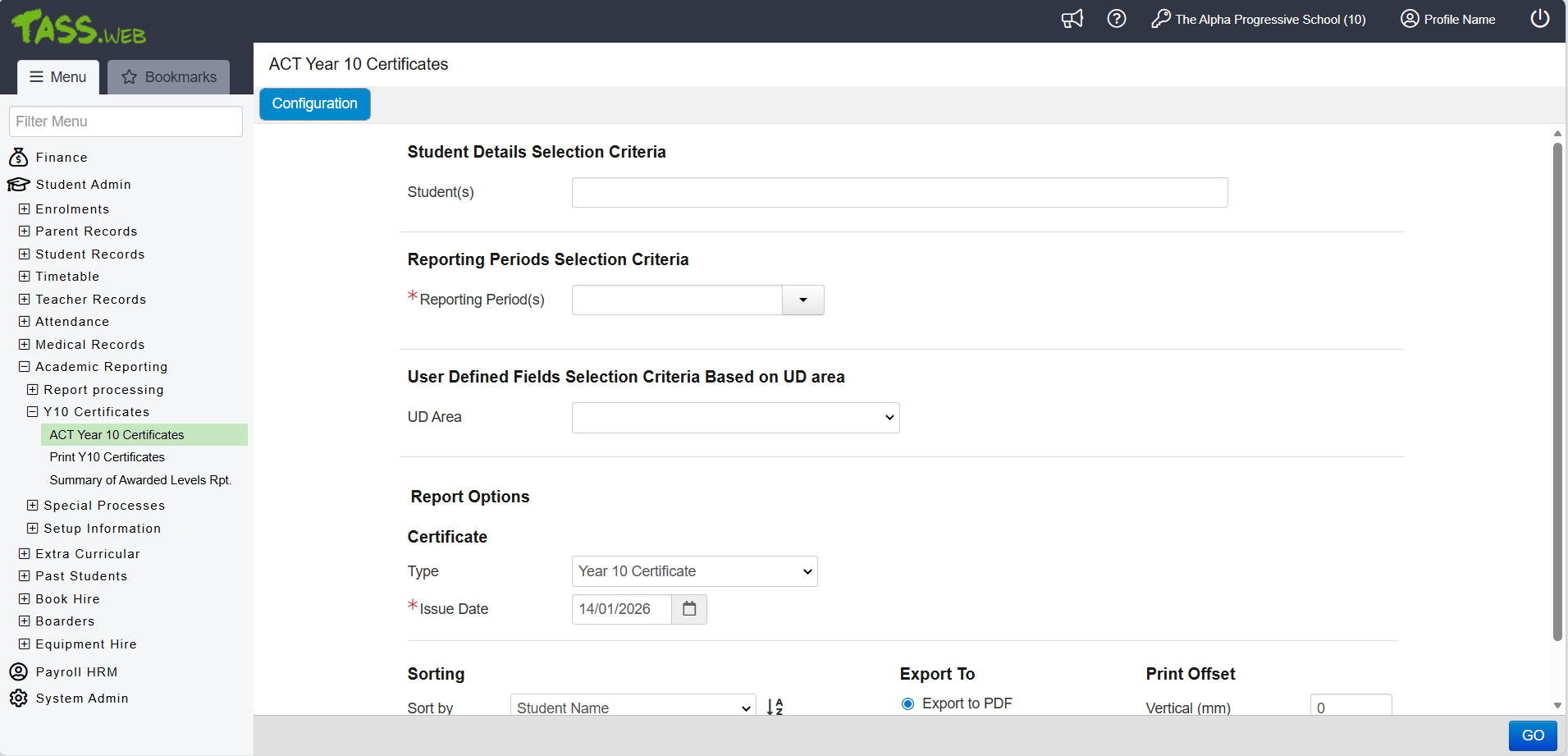 |
ACT Government Census | A new 'ACT Grid' program has been introduced under TASS.web Student Admin > Student Records > Government Reports to enable Australian Capital Territory (ACT) schools to enter ACT Student IDs in bulk and the data extract required for the ACT Census submission. Refer to the 'ACT Grid' article on the TASS Knowledge Base for more information. An image of the ACT Grid program landing page and grid selection criteria options: 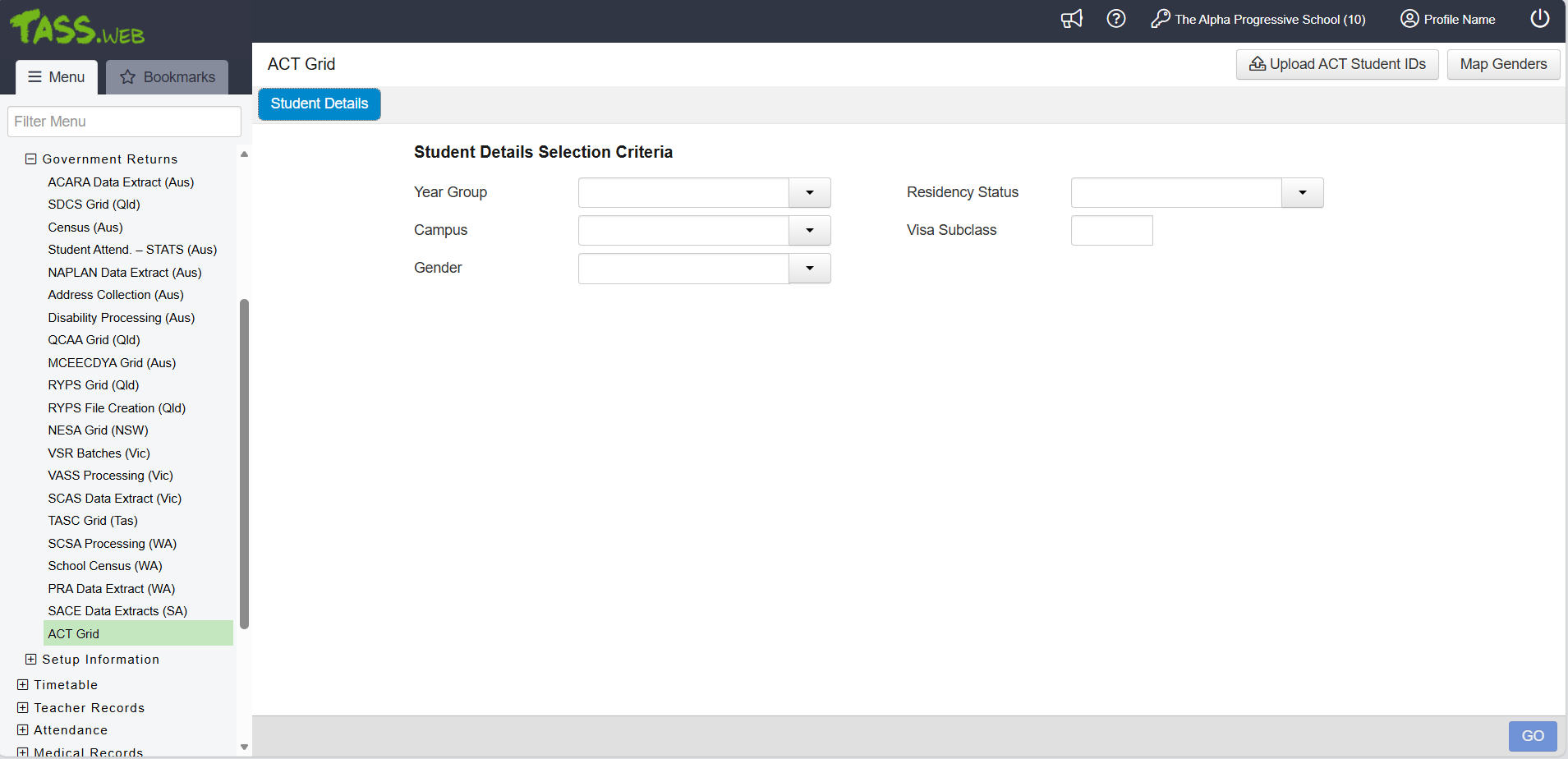 An image of the ‘ACT Grid’ entry screen: 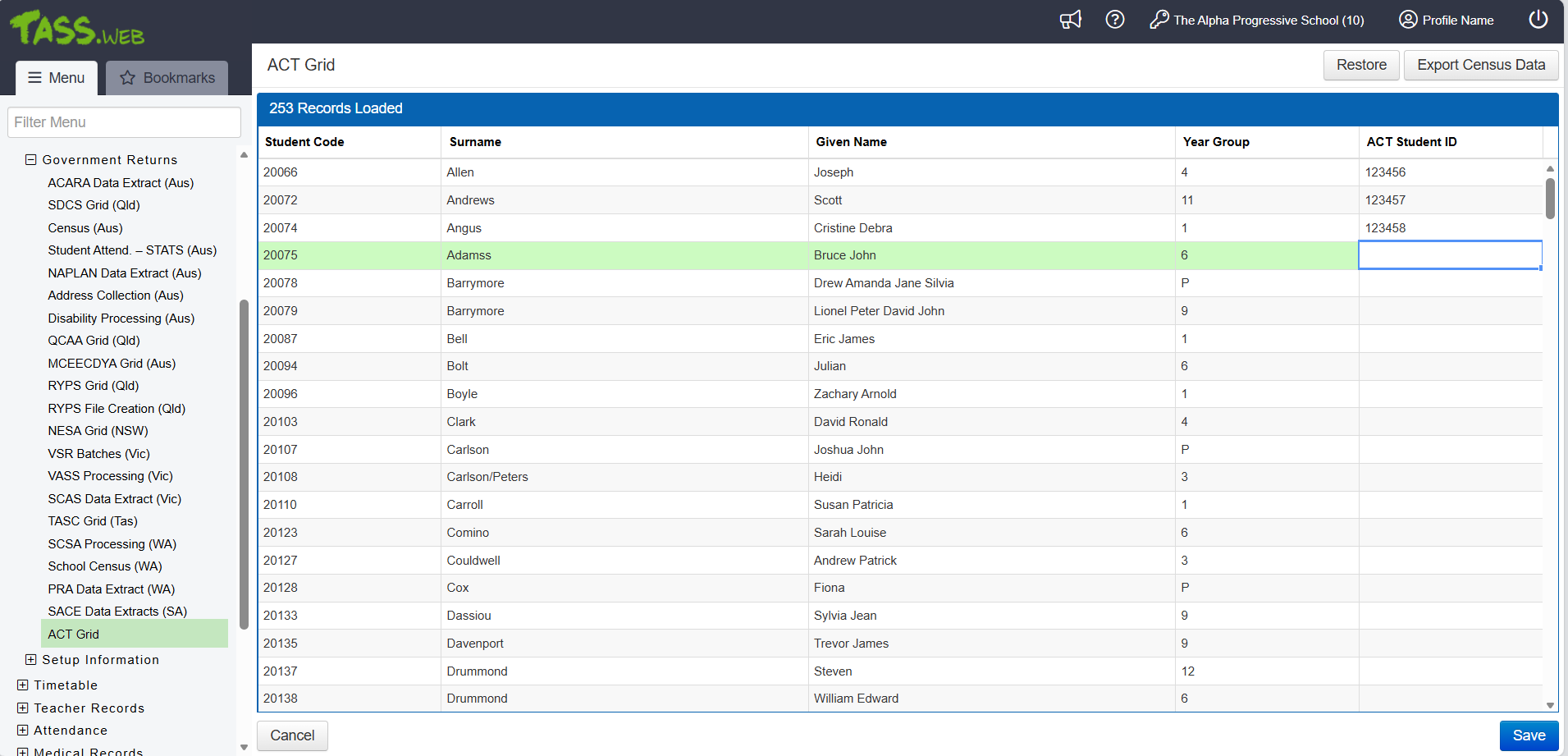 An image of the new ACT Student ID field on the Student Record, available only to schools in the Australian Capital Territory (ACT): 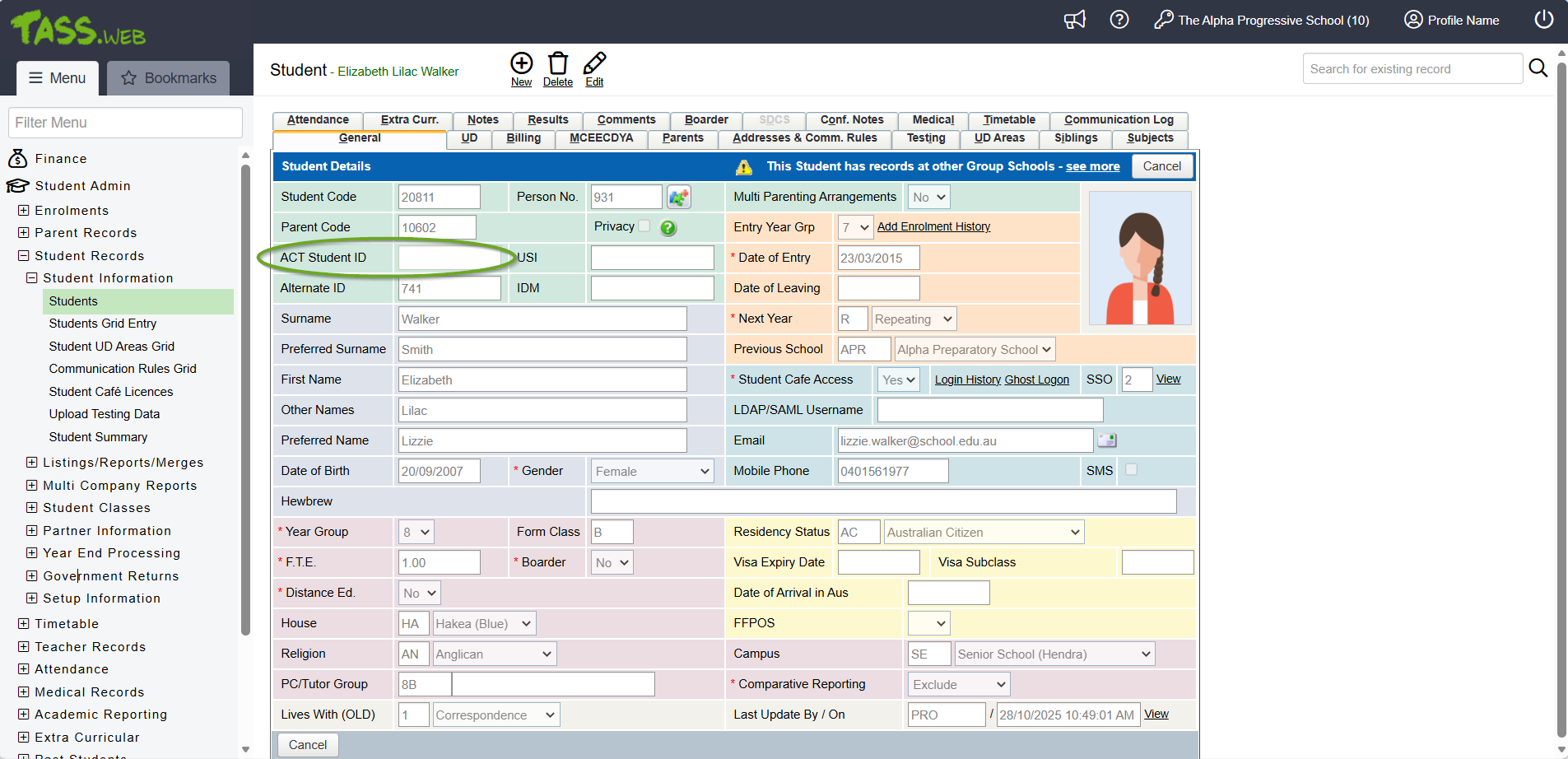 |
License Validation removed from API Gateway Maintenance | APIs are now included in your school's TASS licence, and API License validations have been removed from the API Gateway Maintenance program. This means schools can access TASS APIs and External APIs without extra charges. Your school's licence covers all APIs. We encourage you to explore integration options through our Certified Integration Partner network or contact your Customer Success Consultant for tailored guidance. |
Photo Update Tracking | An audit record with a timestamp now appears in the TASS.web Change Logs Grid program whenever a Student Photo is updated on the Student Profile through TASS.web Student Admin > Student Records > Student Information > Students on the 'General' tab, or when a Student or Employee Image is uploaded using TASS.web System Admin > Utilities > Bulk Image Upload. |
What's New?
Module | Menu | Details | Customer | Reference |
|---|---|---|---|---|
Parent Lounge > Accounts & Payments | Events and Payments | Enhancement to Events and Payments > Accept Event > View Medical Information. A new Medications section allows parents to view and manage their child's medication details when accepting an event. The 'View/Update Details' link provides quick access to the Medical Details program for updates. | MIS01 | TASS-8580 |
Parent Lounge > Accounts & Payments Parent Lounge > Home Page | Events and Payments | Enhancement to Events and Payments. The display order of the listed events is now sorted first by student and then by date in descending order. | MIS01 | TASS-9491 |
Parent Lounge > Home Page | Events and Payments | Enhancement to the Events and Payments section on the Parent Lounge Home Page. When parents click on an event, they are now taken to the specific event information in the Parent Lounge Accounts & Payments > Events and Payment program. | MIS01 | TASS-9494 |
Staff Kiosk > Events | Events and Payments | Enhancement to Events and Payments > Hamburger Menu > View > Hamburger Menu > Print. A new 'Vertical/Horizontal' dropdown list appears in the 'Formatting Options' section when you select the 'Export to Excel' option to set the report's format and orientation. | MIS01 | TASS-9456 |
Staff Kiosk > Events | Events and Payments | Enhancement to Events and Payments > Hamburger Menu > View > Hamburger Menu > Print. The new 'Horizontal' Excel Formatting Option displays one row for each student with columns for every Option and Comment. | MIS01 | TASS-9410 |
Staff Kiosk > Events | Events and Payments | Enhancement to Events and Payments > Hamburger Menu > View > Hamburger Menu > Print. The 'Preferred Name/Given Names/Both' printing option has been moved below the 'Include Parent Comments' checkbox. | MIS01 | TASS-9457 |
Staff Kiosk > Events | Events and Payments | Enhancement to Events and Payments > Hamburger Menu > View > Print. Moved all comments related to events and options from the separate section at the bottom of the Excel file into a single 'Comment' column.
| MIS01 | TASS-9415 |
TASS.web > Academic Reporting | ACT Year 10 Certificates | Enhancement to ACT Year 10 Certificates. The 'Report Options' section of the user interface allows users to select their certificate type and issue date, sort the reports, select the file type and enter numeric print offsets for vertical and horizontal adjustment. | MIS01 | TASS-9321 |
TASS.web > Academic Reporting | ACT Year 10 Certificates | Enhancement to ACT Year 10 Certificates. The 'Reporting Periods Selection Criteria' section enables users to choose the Result Periods for which they need to generate certificates. The 'Reporting Periods' pick list is populated with reporting periods from the previous and current years. | MIS01 | TASS-9492 |
TASS.web > Academic Reporting | ACT Year 10 Certificates | Enhancement to ACT Year 10 Certificates. The 'Student Details Selection Criteria' section has a 'Student(s)' field to choose specific students for report generation. | MIS01 | TASS-9317 |
TASS.web > Academic Reporting | ACT Year 10 Certificates | Enhancement to ACT Year 10 Certificates. The 'User Defined Fields Selection Criteria Based on UD area' section of the user interface allows users to select UD Area for filtering criteria. Once selected, the associated UD text fields for filter criteria entry are displayed. | MIS01 | TASS-9318 |
TASS.web > Academic Reporting | ACT Year 10 Certificates | Enhancement to ACT Year 10 Certificates. Upon clicking 'Go', the Body and Footer of the generated reports display results for Years 9 and 10 for the student(s) specified in the program. Academic Results pertain to the ‘OA’ objective and are sorted by subject area, year, and semester. The footer includes the issuance date plus 'without alteration, erasure or addition'. | MIS01 | TASS-9324 |
TASS.web > Academic Reporting | ACT Year 10 Certificates | Enhancement to ACT Year 10 Certificates. Upon clicking 'Go', the generated report is formatted based on the selection made in the Report Options 'Type' field. | MIS01 | TASS-9407 |
TASS.web > Academic Reporting | ACT Year 10 Certificates | Enhancement to ACT Year 10 Certificates. Upon clicking 'Go', the program extracts the data required for the Year 10 Certificate or High School Record in the relevant format. | MIS01 | TASS-9574 |
TASS.web > Academic Reporting | ACT Year 10 Certificates | Enhancement to ACT Year 10 Certificates. A new 'ACT Year 10 Certificates' program has been introduced to help schools in the Australian Capital Territory (ACT) extract data for the ACT Year 10 Certificate in the required format. | MIS01 | TASS-9315 |
TASS.web > Accounts Payable | Credits | Enhancement to Accounts Payable Credits List. Attachments now open in a new browser tab instead of being downloaded. | MIS01 | TASS-9685 |
TASS.web > Accounts Payable | Invoices | Enhancement to Accounts Payable Invoices List. Attachments now open in a new browser tab instead of being downloaded. | MIS01 | TASS-9686 |
TASS.web > Accounts Payable | Suppliers | Enhancement to Suppliers > Payment Info tab. The 'Account Name' field character limit has been increased from 32 to 64 characters. | HUN01 | TASS-7505 |
TASS.web > Fundraising | Donations | Enhancement to Donations. The 'Date from' and 'Date to' fields now default to display the current financial year dates defined in the TASS.web Finance > General Ledger > Setup Information > Years and Periods. | MIS01 | TASS-9080 |
TASS.web > General Ledger | Ledger Details Report | Enhancement to Ledger Details Report. When the 'Transaction Details Records' layout option is selected, users can now also choose the 'Print Supplier Name' checkbox. When this layout option and checkbox are selected, a 'Supplier Name' column appears in the report alongside each transaction. | MIS01 | TASS-8939 |
TASS.web > School Shop | Student/Family Statements | Enhancement to Student/Family Statement. When the 'Include payment by Cash/Cheque instructions' checkbox is unselected, the payment instructions section will be omitted from the generated School Shop statements. | MIS01 | TASS-9782 |
TASS.web > School Shop | Student/Family Statements | Enhancement to Student/Family Statements > Print tab. A new 'Include payment by Cash/Cheque instructions' checkbox appears in the Formatting Options section, allowing users to control whether the payment instructions section shows on School Shop statements. | MIS01 | TASS-9783 |
TASS.web > Student Records | ACT Grid | Enhancement to ACT Grid > Go > ACT Grid. The 'Export Census Data' button enables users to generate the Census Data Report based on the specified parameters. | MIS01 | TASS-8254 |
TASS.web > Student Records | ACT Grid | Enhancement to ACT Grid > Go > ACT Grid. The 'Export Census Data' screen enables users to input their School Code, specify the address block for Student Addresses, and select the Census Date and Non-School days. | MIS01 | TASS-8615 |
TASS.web > Student Records | ACT Grid | Enhancement to ACT Grid. A new database table has been introduced to store the ACT Student ID data required for ACT Schools to complete Census reporting. | MIS01 | TASS-8246 |
TASS.web > Student Records | ACT Grid | Enhancement to ACT Grid. The 'Student Details Selection Criteria' page allows users to map genders and select the students who will appear in the ACT Grid and the ACT Census Report. | MIS01 | TASS-8252 |
TASS.web > Student Records | ACT Grid | Enhancement to ACT Grid. The 'Upload Student IDs' button allows users to easily upload ACT Student IDs using a CSV file. | MIS01 | TASS-8255 |
TASS.web > Student Records | ACT Grid | Enhancement to ACT Grid. A new menu item has been added beneath Government Returns for the 'ACT Grid' program. This program allows users to complete government returns specific to the Australian Capital Territory. | MIS01 | TASS-8253 |
TASS.web > Student Records | Details Listing | Enhancement to Details Listing. The 'Additional Fields' section now includes 'ACT Student ID' when the user is logged into a company that has its 'State' set to the Australian Capital Territory (ACT). | MIS01 | TASS-8249 |
TASS.web > Student Records | Labels/Letter Merges | Enhancement to Labels/Letter Merges. The 'Additional Fields' section now includes 'ACT Student ID' when the user is logged into a company that has its 'State' set to the Australian Capital Territory (ACT). | MIS01 | TASS-8250 |
TASS.web > Student Records | Multi Coy Student Details Listing | Enhancement to Multi Coy Student Details Listing. The 'Additional Fields' section now includes 'ACT Student ID' when the user is logged into a company that has its 'State' set to the Australian Capital Territory (ACT). | MIS01 | TASS-8251 |
TASS.web > Student Records | Students | Enhancement to the Student Record > 'General' tab. A new 'ACT Student ID' field appears when the user is logged into a company that has its 'State' set to the Australian Capital Territory (ACT). | MIS01 | TASS-8247 |
TASS.web > Student Records | Students | Enhancement to the Student Record. When a Student Image is updated, a database record is created with a timestamp of when the image was uploaded, and an audit record appears in TASS.web System Admin > Utilities > Change Logs Grid. | MIS01 | TASS-9596 |
TASS.web > Users | User Maintenance Security Role Permissions | Enhancement to User Security Permissions. A new permission point for 'ACT Grid' has been added. When this permission is enabled, users can access the 'ACT Grid' program in TASS.web Student Admin > Student Records > Government Returns. | MIS01 | TASS-8248 |
TASS.web > Users | User Maintenance Security Role Permissions | Enhancement to User Security Permissions. A new 'ACT Year 10 Certificates' permission point has been introduced to allow users access to the 'ACT Year 10 Certificates' program in the TASS.web Student Admin > Academic Reporting > Y10 Certificates menu. | MIS01 | TASS-9315 |
TASS.web > Utilities | API Gateway Maintenance | Enhancement to API Gateway Maintenance. License validation checks have been removed for all APIs except Orbit Parent (API27), Orbit Staff (API28), and Orbit Student (API32). | MIS01 | TASS-9136 |
TASS.web > Utilities | API Gateway Maintenance | Enhancement to External APIs > LISS Integration. The API now functions without a separate licence. The license validation check has been removed. | MIS01 | TASS-9431 |
TASS.web > Utilities | API Gateway Maintenance | Enhancement to External APIs > Orbit Parent Push Notifications. The API now functions without a separate licence. The license validation check has been removed. | MIS01 | TASS-9428 |
TASS.web > Utilities | API Gateway Maintenance | Enhancement to External APIs > Orbit Staff Push Notifications. The API now functions without a separate licence. The license validation check has been removed. | MIS01 | TASS-9429 |
TASS.web > Utilities | API Gateway Maintenance | Enhancement to External APIs > PDF Conversion. The API now functions without a separate licence. The license validation check has been removed. | MIS01 | TASS-9427 |
TASS.web > Utilities | API Gateway Maintenance | Enhancement to External APIs > Single Touch Payroll Gateways. The API now functions without a separate licence. The license validation check has been removed. | MIS01 | TASS-9430 |
TASS.web > Utilities | API Gateway Maintenance | Enhancement to External APIs. The 'Licence Required' column has been removed from the External API grid as all External APIs are now covered under the general TASS licence. | MIS01 | TASS-9201 |
TASS.web > Utilities | API Gateway Maintenance | Enhancement to OAuth2 API Applications > Orbit Parent. The 'getStudentMedications' endpoint has been updated to adhere to the Medication Tab permissions configured in TASS.web Student Admin > Medical Records > Setup Information > Medical Setup on the 'Parent Lounge' tab. ^ | MIS01 | TASS-9475 |
TASS.web > Utilities | API Gateway Maintenance | Enhancement to TASS APIS. TASS APIs now operate without requiring separate licences. The license validation check has been removed, allowing TASS APIs to function under the general TASS licence. | MIS01 | TASS-9137 |
TASS.web > Utilities | API Gateway Maintenance | Enhancement to TASS APIs. The 'Licence Code' field has been renamed 'Licence Code (Reference)', and the following hover-over text has been added: "Licence codes are for categorisation and reference only. Active API licences are not required." | MIS01 | TASS-9135 |
TASS.web > Utilities | Bulk Image Upload | Enhancement to Bulk Image Upload. When a Student Image or Employee Image is updated, a database record is created with a timestamp of when the image was uploaded, and an audit record appears in TASS.web System Admin > Utilities > Change Logs Grid. | MIS01 | TASS-9597 |
Corrections
Module | Menu | Details | Customer | Reference |
|---|---|---|---|---|
Parent Lounge > Home Page | Parent Teacher Interviews | Correction to Parent Teacher Interviews. Updated the Mobile Number fields to prevent bracketed information, such as (M) or (F), from showing and to allow PTI bookings to be submitted when the mobile numbers include bracketed information. | MIS01 | TASS-9397 |
Staff Kiosk > Assessment | Activity Planner | Correction to the Activity Planner to ensure that uploaded activity files, including drafts and annotated files, are visible in the Activity Files section of the Activity Record on the Activity Assessment and Activity Assessment Files Grid Screen. * | NUD01 | TASS-10403 |
Staff Kiosk > Assessment | Enter Results and Comments | Correction to Enter Results and Comments to improve program performance and load times. | TOO02 | TASS-9642 |
Staff Kiosk > Assessment | Learning Objects (Maintain & Assign) | Correction to Learning Objects (Maintain & Assign) to ensure that Learning Objects can be opened without displaying an error message saying, "This Learning Object has been removed. The program will now reload." | MIS01 | TASS-10019 |
Staff Kiosk > Extra Curricular | Extra Curricular Groups | Correction to Extra Curricular Groups > Hamburger Menu > Sessions > Add Fixture. Update to resolve the infinite loading issue and ensure the screen refreshes in real time after creating fixtures. | MIS01 | TASS-9336 |
Staff Kiosk > Listings | Class List/Emails | Correction to Class List/Emails to prevent an internal server error when attempting to export to Excel. | TORR01 | TASS-9625 |
Staff Kiosk > Student Profile | Communication Log | Correction to the Student Communication Log to ensure long text wraps around within the field and doesn't stretch off-screen with a long scroll bar. | CLA02 | TASS-9659 |
TASS.web > Bookmarks tab | Bookmarks | Correction to Bookmarks to improve program security. | MIS01 | TASS-9709 |
TASS.web > Bookmarks tab | My Saved Lists | Correction to My Saved Lists > Hamburger Menu > Maintain Schedules. When a scheduled listing email is sent from TASS.web, the email now displays: "Sign in to TASS.web, open My Saved Lists, to check your scheduled reports," instead of the previous "Click here to review your Scheduled Listings", which appeared as a non-functional link. | MIS01 | TASS-2261 |
TASS.web > Parent Accounts | Charges & Credits | Correction to Charges & Credits > Print > Print Charges/Credits screen. When users click 'Go' to generate the Charge / Credit Listing, the 'Go' button becomes disabled. | MIS01 | TASS-9774 |
TASS.web > Parent Accounts | Parent Transactions Report | Correction to Parent Transactions Report. Update to ensure that the report generates correctly when Parent UD filters are applied, and the Detailed Report layout option is selected. | MIS01 | TASS-3806 |
TASS.web > Student Records | Student UD Areas Grid | Correction to Student UD Areas Grid > General tab. The program now includes non-current students when filtered on date of leaving and date of entry. | MEN01 | TASS-674 |
TASS.web > Student Records | Students | Correction to Student Records > Communication Log. Update to ensure that only SMS messages related to the student are displayed. | NOR03 | TASS-8511 |
TASS.web > Teacher Records | Teachers Change Teacher Code | Correction to Teacher Records. In Enterprise Mode, the same 'Teacher Code' can now be used across multiple companies, as long as they are not used for notes within the same company. * | CEO01 | TASS-9756 |